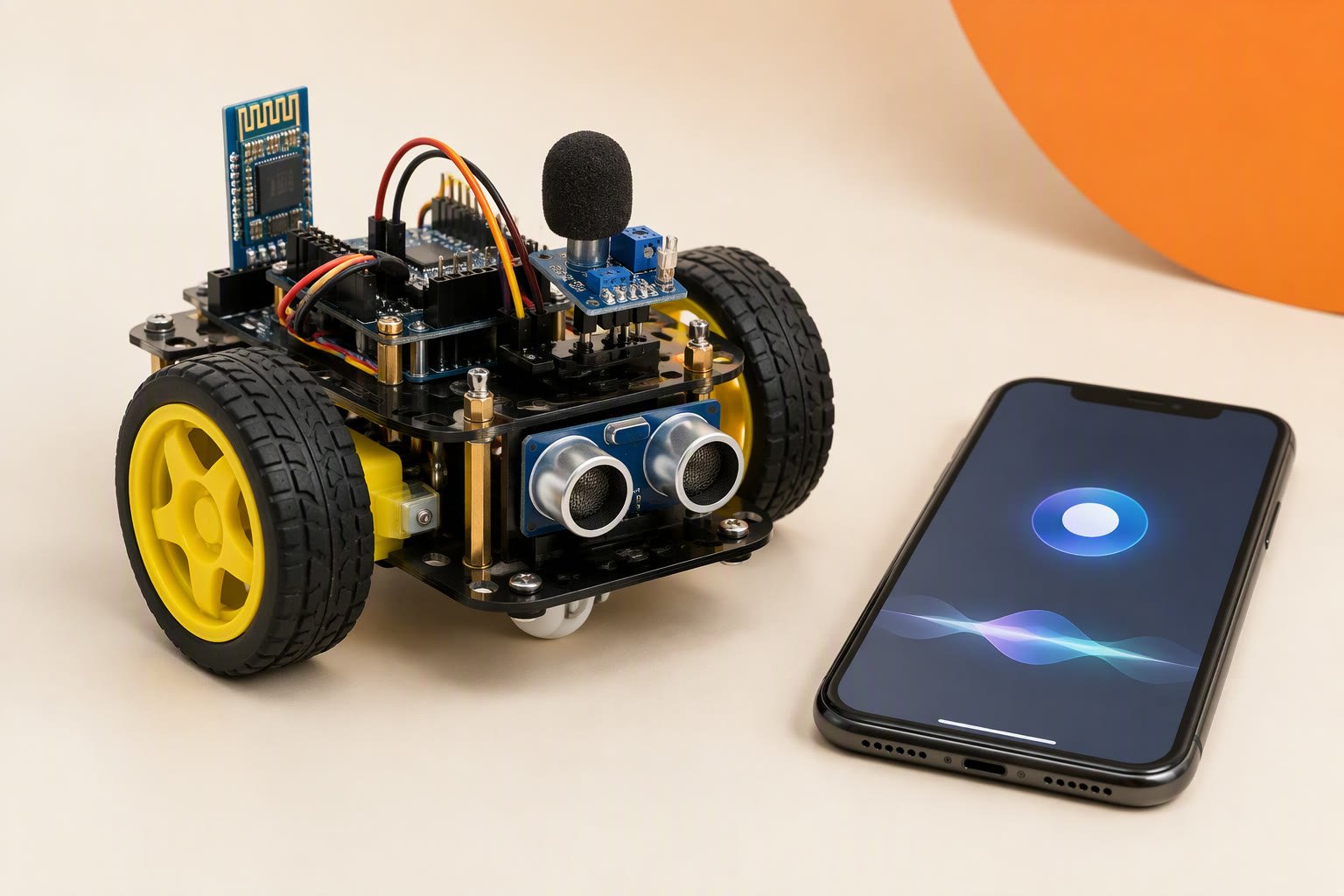
A ₹2,100 voice-controlled robot is a serial parser with a watchdog, not a science project: the microphone can live in a phone or on a module, and the Arduino only ever sees short text frames. The car moves on six commands, stops itself when the link goes quiet, and keeps speech recognition off the motor controller. This sheet covers the honest limits of phone recognition and offline modules, the command map, the serial protocol, the sketch and a test plan that checks the stop before it checks the trick.
Scope: intermediate. No app to write, no cloud service, no custom PCB. A two-wheel car with an L298N and a 2S pack. The ₹2,100 bill of materials is the Bluetooth route; an offline module is a drop-in replacement for the radio, and the robot code does not change.
Bill of materials
| Part | Qty | Unit | Total |
|---|---|---|---|
| Arduino Uno R3 clone | 1 | ₹450 | ₹450 |
| L298N motor driver module | 1 | ₹180 | ₹180 |
| HC-05 Bluetooth module | 1 | ₹320 | ₹320 |
| TT gear motors with wheels, pair | 1 | ₹260 | ₹260 |
| 2WD acrylic chassis with caster | 1 | ₹190 | ₹190 |
| 2S 18650 holder with protected cells | 1 | ₹420 | ₹420 |
| 5 V 2 A buck converter | 1 | ₹220 | ₹220 |
| Switch, 1 kΩ and 2 kΩ resistors, wires | 1 | ₹60 | ₹60 |
| Parts total | ₹2,100 | ||
Scroll the table sideways to see every column.
Prices checked Oct 2026. Shipping and tools are not included.
The total excludes the phone, charger, shipping, tools and a spare L298N. Prices are typical Indian retail in October 2026, before shipping.
Phone speech-to-text or an offline module
Both routes end in the same place: ASCII characters arriving on an Arduino serial port. What differs is where the audio is recognised, and therefore what fails when the room is noisy or the network is down.
Phone route. An Android app records the phrase, the phone’s speech engine turns it into text, and the text goes over Bluetooth SPP to an HC-05. The vocabulary is large and there is nothing to train. The costs are latency and dependence: most engines use a network service, a phrase can take a second or more, and dictation adds spaces, capitals and punctuation. The app must also be able to send to a Bluetooth serial device, and iOS does not expose SPP to an HC-05, so an iPhone needs a different radio or a Wi-Fi car.
Offline module. A module such as the Elechouse Voice Recognition V3, or a cheaper SU-03T-class board, stores a fixed set of phrases and recognises them on the robot. No phone and no network are involved, and the response is fast because the audio never leaves the board. The limits are vocabulary, training and noise: the Elechouse module is commonly trained by the speaker, the number of phrases active at once is small, and both types mishear in a room with a fan or a television. The exact module is optional; any board that emits a line of text over UART at 9600 baud will work with the sketch below.
Offline in this build means the commands are executed on the robot, not in the cloud. It does not mean the phone route is private or network-free, because the recognition step may still be online.
What ₹2,100 buys
The bill of materials is the HC-05 version. Swapping the radio for an offline module changes one line: an SU-03T-class board costs about ₹400–700 and keeps the build near ₹2,200–2,500, while an Elechouse V3 at ₹1,800–2,800 takes the total to roughly ₹3,600–4,600. The Arduino, driver, motors and power stay the same.
Pin map and power
| Module | Arduino Uno | Note |
|---|---|---|
| HC-05 VCC / GND | 5V / GND | The breakout has a 3.3 V regulator for the radio |
| HC-05 TXD | D3 | Straight wire; 3.3 V reads HIGH on a 5 V Uno |
| HC-05 RXD | D2 through a divider | 1 kΩ from D2, 2 kΩ to GND, about 3.3 V at the pin |
| L298N ENA / ENB | D5 / D6 | PWM speed; remove both jumpers |
| L298N IN1 / IN2 | D7 / D8 | Left motor direction |
| L298N IN3 / IN4 | D9 / D10 | Right motor direction |
| Buck 5 V | Uno 5V and HC-05 VCC | Set to 5.0 V before connecting |
| 2S pack | L298N +12V through the stop switch | Check polarity twice |
| All grounds | Common GND | Pack, L298N, buck, Uno, HC-05 |
The HC-05’s RX pin is not 5 V tolerant. Without the divider the module may pair, accept a few commands and then drop them under load. If you use an offline module instead, check its logic level and supply range in its own documentation; the Elechouse board is normally powered at 5 V, while some small modules are 3.3 V parts on a 5 V breakout.
The serial protocol
The robot accepts one newline-terminated frame at a time, up to 15 characters, case-insensitive. A frame is either a single command letter or a word from the table in the sketch. Replies are short so that a slow radio link does not queue up stale text.
| Frame | Meaning | Reply |
|---|---|---|
F | Forward at the current speed preset | OK F |
B | Reverse | OK B |
L / R | Pivot left / right in place | OK L / OK R |
S | Brake and disarm | OK S |
1–5 | Select a speed preset | OK 3 |
P | Heartbeat, no movement | PONG |
| Anything else | Ignored | ERR |
The heartbeat matters. A phrase is sent once, but the robot needs to know the link is still alive. The phone app sends P every 300 ms; the offline module is configured to send a short keep-alive frame, or the sketch’s timeout is raised for that route. Without a heartbeat, a dropped Bluetooth link looks exactly like a robot that has been told to keep driving.
Command mapping
| Spoken phrase | Text sent | Frame | Action |
|---|---|---|---|
| “forward”, “go” | FORWARD | F | Both motors forward |
| “back”, “reverse” | BACK | B | Both motors reverse |
| “left” | LEFT | L | Pivot left at the slow preset |
| “right” | RIGHT | R | Pivot right at the slow preset |
| “stop”, “halt” | STOP | S | Brake and disarm |
| “slow”, “fast” | SLOW / FAST | 1 / 3 | Change the speed preset |
Map words to actions in one place, as the TABLE array does, so a misheard phrase is a table edit rather than a hunt through the sketch. Single letters stay available for a serial terminal test, which is how you separate a recognition problem from a robot problem.
The sketch, with a watchdog
// Voice-controlled car: Uno + HC-05 (or offline module) + L298N
// Frames are newline-terminated ASCII: F, B, L, R, S, 1-5, P.

#include <SoftwareSerial.h>
SoftwareSerial bt(3, 2);          // RX = D3 from module TX, TX = D2 to module RX

const int ENA = 5, IN1 = 7, IN2 = 8;
const int ENB = 6, IN3 = 9, IN4 = 10;
const unsigned long FAILSAFE_MS = 700;
const int SPEEDS[5] = {110, 140, 170, 200, 225};

char buf[16];
uint8_t len = 0;
int speedIndex = 2;
bool armed = false;
unsigned long lastFrame = 0;

struct Entry { const char *word; char code; };
const Entry TABLE[] = {
  {"FORWARD", 'F'}, {"GO", 'F'}, {"BACK", 'B'}, {"REVERSE", 'B'},
  {"LEFT", 'L'}, {"RIGHT", 'R'}, {"STOP", 'S'}, {"HALT", 'S'},
  {"SLOW", '1'}, {"FAST", '3'}, {"PING", 'P'}
};

void setup() {
  Serial.begin(9600);
  bt.begin(9600);
  pinMode(ENA, OUTPUT); pinMode(ENB, OUTPUT);
  pinMode(IN1, OUTPUT); pinMode(IN2, OUTPUT);
  pinMode(IN3, OUTPUT); pinMode(IN4, OUTPUT);
  brake();
}

void loop() {
  while (bt.available()) {
    char c = bt.read();
    if (c == '\n' || c == '\r') {
      while (len && buf[len - 1] == ' ') len--;
      char *p = buf;
      while (*p == ' ') p++;
      if (*p) { buf[len] = 0; handle(p); }
      len = 0;
    } else if (len < sizeof(buf) - 1) {
      buf[len++] = c;
    }
  }
  if (armed && millis() - lastFrame > FAILSAFE_MS) brake();
}

void handle(char *s) {
  for (uint8_t i = 0; s[i]; i++) s[i] = toupper(s[i]);
  char code = (s[1] == 0) ? s[0] : 0;
  if (!code) {
    for (uint8_t i = 0; i < sizeof(TABLE) / sizeof(TABLE[0]); i++) {
      if (strcmp(s, TABLE[i].word) == 0) { code = TABLE[i].code; break; }
    }
  }
  if (!code) { bt.print("ERR\n"); return; }
  apply(code);
}

void apply(char c) {
  switch (c) {
    case 'F': drive(SPEEDS[speedIndex], SPEEDS[speedIndex]); break;
    case 'B': drive(-SPEEDS[speedIndex], -SPEEDS[speedIndex]); break;
    case 'L': drive(-SPEEDS[0], SPEEDS[0]); break;
    case 'R': drive(SPEEDS[0], -SPEEDS[0]); break;
    case 'S': brake(); break;
    case 'P': bt.print("PONG\n"); lastFrame = millis(); return;
    default:
      if (c >= '1' && c <= '5') { speedIndex = c - '1'; }
      else { bt.print("ERR\n"); return; }
  }
  if (c != 'S') { armed = true; lastFrame = millis(); }
  bt.print("OK "); bt.print(c); bt.print('\n');
}

void drive(int l, int r) {
  digitalWrite(IN1, l >= 0); digitalWrite(IN2, l < 0);
  digitalWrite(IN3, r >= 0); digitalWrite(IN4, r < 0);
  analogWrite(ENA, min(abs(l), 255));
  analogWrite(ENB, min(abs(r), 255));
}

void brake() {
  digitalWrite(IN1, LOW); digitalWrite(IN2, LOW);
  digitalWrite(IN3, LOW); digitalWrite(IN4, LOW);
  analogWrite(ENA, 0); analogWrite(ENB, 0);
  armed = false;
}
Three details are deliberate. The buffer is fixed-size, so a long or corrupted line cannot overrun memory. Unknown frames get an error instead of a guess. And brake() clears the armed flag, so a stop needs a new command before the car moves again. The serial mirror is optional; printing to USB while the radio is live costs time.
Safety stop
Software cannot be the only stop. Put a latching switch or a large normally-closed button in the L298N +12V line, within reach, and keep the logic powered so the Arduino can report what happened. A switch in the 5 V logic line is the wrong choice: the driver can stay energised while the brain is off.
The software stop is the 700 ms watchdog plus the boot state. The robot starts disarmed, ignores everything until a valid frame arrives, brakes on S, and brakes when the link goes quiet. Cap the top speed preset at a value the car can stop from within the length of your test area. The power guide explains the separate logic rail; the battery guide explains why a sagging pack can reset the Uno mid-command.
Test plan
- Wheels up: send F, B, L and R from a Bluetooth serial app. Confirm direction; swap a motor’s two leads rather than editing the code.
- Acknowledgements: every valid frame should return
OK, and garbage should returnERR. If nothing returns, the divider or the TX/RX crossing is wrong. - Watchdog: send F, then stop sending. The motors must brake after the timeout. A car that keeps rolling has a parser or a wiring fault, not a voice fault.
- Recognition: say each phrase three times in a quiet room and note which attempt produced which frame. Repeat with a fan running. Tune the phrase table, not the motors.
- Latency: time the gap between the end of a phrase and movement. If it is longer than your reaction distance at the chosen speed, slow the car down.
- Range: test at 2, 5 and 10 m with the phone in sight. HC-05 range is typically quoted around 10 m in open air and is worse through a wall or a body.
- Emergency stop: at full speed, press the hardware stop. Then repeat by switching off Bluetooth mid-run. Both must stop the car without touching the phone.
- Thermal and battery: run for ten minutes and check the L298N heatsink and the pack voltage. A hot driver or a pack below 7 V will cause faults that look like bad recognition.
What usually goes wrong
| Symptom | Likely cause | Fix |
|---|---|---|
| Phone pairs but no reply | TXD/RXD not crossed, missing divider, wrong baud | Module TXD to D3, D2 through the divider to RXD, 9600 both ends |
| Motors twitch and stop | Watchdog expires because the app sends one frame per press | Send a heartbeat every 300 ms, or raise the timeout for that route |
| Car moves at power-on | Motors enabled before the first valid frame | Call brake() in setup and start with armed = false |
| Wrong action for a phrase | Two phrases too similar, or dictation added a word | Rename the phrase, trim spaces, keep the table short |
| Uno resets when the car starts | Logic and motors sharing a sagging 5 V rail | Buck converter for logic, common ground, 100 µF across 5 V |
| Works near the phone, fails across the room | Bluetooth range or an antenna blocked by the chassis | Keep the module clear of metal, test line of sight, shorten the distance |
| Hardware stop does nothing | Switch wired into the logic supply, not the motor supply | Put it in the L298N +12V line and test it at full speed |
For an iPhone, skip the HC-05 and use an ESP32 car that serves its own web page, as in the ESP32 robot car build. For the Uno itself, the Uno guide lists the PWM pins and the current limits, and the L298N guide explains the voltage drop and heatsink. Neither radio choice changes the protocol.
Sources and further reading
- Arduino language reference for
SoftwareSerial,millis()and the string functions used in the parser. - Texas Instruments L298 datasheet for the driver’s voltage drop and current ratings.
- Battery University: types of lithium-ion for how a 2S pack behaves under motor load.
Last reviewed: October 2026. Reviewed against component datasheets, the Arduino reference and vendor documentation for the HC-05 and voice modules; this build has not been bench-tested by this site. Recognition accuracy depends on the phone, language model and room.