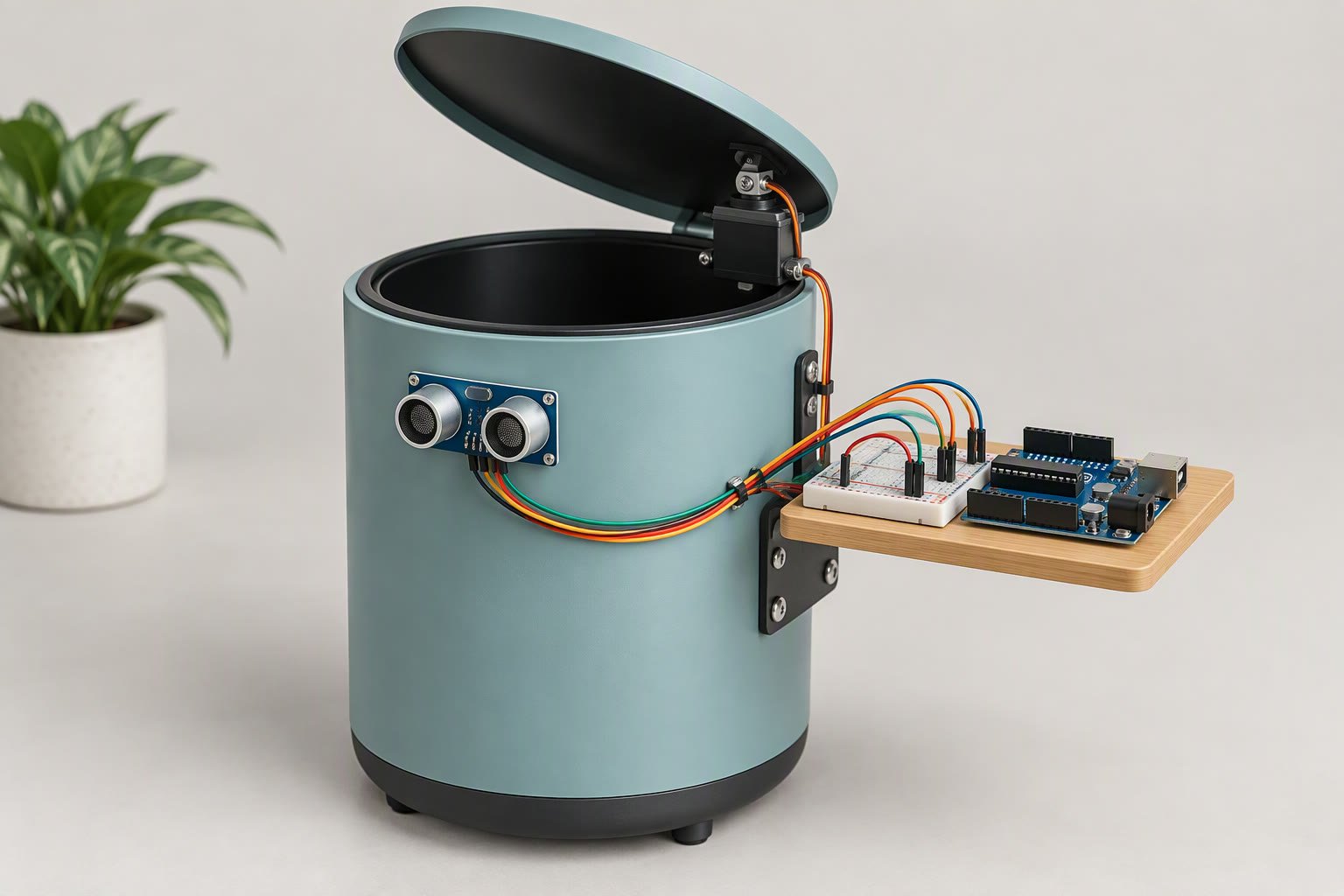
Mount the HC-SR04 facing out at about 60–70 cm above the floor, open the lid when something comes closer than 35 cm, keep it open until the reading passes 50 cm, and close after a three-second hold. That gap between the open and close distances is the whole trick. Without it the lid chatters every time a person stands still, and the servo buzzes itself warm in an afternoon. This smart dustbin Arduino build rests on one habit: leave a gap between the open and close distances.
This is a one-servo build, so its failure modes are narrow: a sensor that misses soft clothing, a servo fed from the Arduino’s 5 V pin, and a lid heavier than the horn can lift. Each fix costs under ₹300.
How the lid decides to open
A single distance threshold cannot work, because a person standing at the bin produces a reading that wobbles by a centimetre or two. If the code opens under 35 cm and closes above 35 cm, the lid will hunt. Two thresholds plus a time delay remove the hunting without adding hardware.
| State | Opens when | Stays open while | Closes when |
|---|---|---|---|
| Lid closed | Distance under 35 cm | n/a | n/a |
| Lid open | n/a | Distance under 50 cm, or 3 s since the last close reading | No reading under 50 cm for 3 s |
The three-second hold matters as much as the band. A hand reaching for the bin moves, so the distance jumps; a short hold keeps the lid open through that. Longer holds feel sluggish and waste battery. Two to four seconds suits most people.
Where should the servo get its 5 V?
The HC-SR04 uses four wires: VCC to 5 V, GND to ground, TRIG to D9 and ECHO to D10. The servo signal goes to D6, with its power and ground taken from a supply that is not the Arduino’s regulator. That last sentence is where most builds go wrong.
| Servo supply | What the servo sees | What usually happens | Use it when |
|---|---|---|---|
| Arduino 5 V pin | The board’s regulator, shared with the sensor and the USB chip | Jitter, buzzing at rest, resets when the lid starts to move, a hot regulator | Never for a moving lid. Fine for a test with nothing attached |
| Separate 5 V 2 A adapter | A clean 5 V rail that only the servo uses | Reliable, but two power leads to the bin | Bench builds and classroom demos |
| 5 V 2 A buck from the battery | A regulated rail from the same 2S pack | Reliable if the buck is rated honestly and has a capacitor on its output | Portable builds, with protected cells |
| 6 V supply | More torque, faster movement | Works only if the servo is rated for 6 V; check its datasheet | Heavier lids that need more margin |
An SG90 pulls a few hundred milliamps while moving and more when it stalls. The Arduino’s regulator cannot supply that alongside the sensor and the USB link without dropping voltage. The SG90 guide covers the current figures and the stall cases worth avoiding.
The sketch: a non-blocking lid
The loop never uses a delay to time the open period. It samples the sensor every 70 ms, decides, and writes the servo only when the state changes. Writing the same angle repeatedly is what makes a cheap servo hum.
// Smart dustbin: HC-SR04 + SG90 lid on an Arduino Uno or Nano
// Servo power comes from a separate 5 V supply with a common ground.

#include <Servo.h>
Servo lid;

const int TRIG = 9, ECHO = 10, SERVO_PIN = 6;
const int OPEN_CM = 35;          // open closer than this
const int HOLD_CM = 50;          // stay open until the reading passes this
const int OPEN_ANGLE = 95, CLOSED_ANGLE = 0;
const unsigned long HOLD_MS = 3000;
const unsigned long SAMPLE_MS = 70;

bool isOpen = false;
unsigned long lastSeen = 0, lastSample = 0;

void setup() {
  lid.attach(SERVO_PIN);
  lid.write(CLOSED_ANGLE);
  pinMode(TRIG, OUTPUT);
  pinMode(ECHO, INPUT);
}

long readCm() {
  digitalWrite(TRIG, LOW);
  delayMicroseconds(2);
  digitalWrite(TRIG, HIGH);
  delayMicroseconds(10);
  digitalWrite(TRIG, LOW);
  unsigned long us = pulseIn(ECHO, HIGH, 25000UL);   // 25 ms cap, about 4 m
  if (us == 0) return -1;                            // no echo came back
  return us / 58;                                    // microseconds to centimetres
}

void loop() {
  unsigned long now = millis();
  if (now - lastSample < SAMPLE_MS) return;
  lastSample = now;

  long d = readCm();
  int limit = isOpen ? HOLD_CM : OPEN_CM;
  bool near = (d > 0 && d < limit);

  if (near) lastSeen = now;
  if (!isOpen && near) { lid.write(OPEN_ANGLE); isOpen = true; }
  if (isOpen && now - lastSeen > HOLD_MS) { lid.write(CLOSED_ANGLE); isOpen = false; }
}
pulseIn blocks for up to 25 ms while it waits, which is why the sample interval is 70 ms rather than 10 ms. The Servo library drives its pulses from a timer interrupt, so a blocking read does not disturb the lid angle. If your lid still twitches, the cause is the supply, not the timing.
Lid geometry the servo can actually lift
A hobby servo is rated in kilogram-force centimetres. Torque is the lid’s weight times the horizontal distance from the hinge to its centre of mass. Keep it at or below half the servo’s rating. A top-hinged lid loads the servo most when shut, when the centre of mass is farthest out; the load falls as it rises.
Worked example: a 120 g lid with its centre of mass 4 cm from the hinge needs 0.12 × 9.81 × 0.04 = 0.047 N·m, which is about 0.48 kgf·cm. An SG90 datasheet lists roughly 1.8 kgf·cm at 4.8 V, so this lid uses about a quarter of the rating. A 300 g lid at 6 cm needs 0.3 × 9.81 × 0.06 = 0.177 N·m, or 1.8 kgf·cm, and that is the full rating before friction. Run your own numbers through the servo torque calculator before you cut the lid.
- Shorten the horn. A 20 mm arm gives more torque than a 40 mm arm but sweeps a smaller angle; a short horn plus a longer linkage often beats a long horn alone.
- Put the hinge at the lid edge and align the servo axis with it. An offset axis loads the servo against its own bearing and eats torque.
- Add a counterweight behind the hinge, or move the hinge so the lid balances. This is free torque.
- Use a real hinge pin. Do not let the servo’s output shaft carry the lid’s weight; support the lid on a 3 mm pin in a bracket and couple the servo to it.
- Keep fingers out of the closing edge. A servo can pinch. A foam strip on the rim is cheap insurance, and the three-second hold warns people the lid is about to move.
Why soft surfaces and narrow objects fool the sensor
The HC-SR04 sends a burst of 40 kHz sound and times the echo. Anything that absorbs or scatters that burst returns too little energy, and the module reports nothing. Cloth, curtains, foam, a person in a loose hoodie and the bin’s own plastic bag all behave this way. A cloth bag hanging at 30 cm can be missed while a wall at 2 m is detected reliably. Those false readings are why a smart dustbin Arduino build can miss soft or narrow objects, so test with the things people actually carry.
Three behaviours matter before you blame the code. The cone is roughly 15 degrees wide, so a narrow object must be almost straight ahead. The minimum range is about 2 cm, so a hand pressed against the sensor reads as nothing. Two modules mounted side by side cause cross-talk and random long readings; trigger them one at a time. The HC-SR04 guide has the datasheet numbers and pin details.
Fix missed detections with geometry, not code. Aim at hip height, where a body presents a large flat surface, keep the sensor clear of the bin’s rim and bag, and avoid a wall closer than about 1.5 m. In a corridor, aim along it rather than across it.
Smart dustbin Arduino enclosure and mounting notes
- Give the sensor its own hole. A 16 mm hole for each transducer can, with the module pressed flush against the inside of the panel. Do not cover it with mesh or tape.
- Keep the servo and the sensor apart. Gearbox noise is broadband, and a sensor cable running beside the servo lead picks it up. Route the sensor lead away from the servo and power lead.
- Strain-relieve the lid cable. The lid moves; the wire should flex in a loop, not at the connector.
- Leave room for the closed lid. Dry-fit the arm and check the closed angle before you drill; a servo driving into a mechanical stop will buzz and heat.
- Power switch outside. You will power-cycle this build while tuning, so keep the switch reachable without lifting the lid.
What it costs
| Item | Planning price (INR) |
|---|---|
| Arduino Nano or Uno clone | ₹300–700 |
| HC-SR04 ultrasonic sensor | ₹90–180 |
| SG90 servo | ₹150–250 |
| 5 V 2 A adapter, or buck converter for a battery build | ₹200–350 |
| Servo horn, hinge pin, brackets | ₹100–250 |
| Lid material and fixings | ₹100–300 |
| Wires, 470 µF capacitor, switch | ₹80–150 |
| Dustbin, if you do not already own one | ₹0–400 |
| Total | ₹1,020–2,580 |
This build sheet is reviewed against datasheets and vendor listings; test your own robot before relying on it. Test a person walking up, someone standing still, an empty doorway and a hand waved at the side; those four cases find most tuning problems.
If the bin is a college submission, the free project pack has a BOM sheet, a test log and a report outline you can fill in as you tune the thresholds.
Common questions
Why does the lid open and close on its own?
Something is crossing the threshold repeatedly: a wall inside 50 cm, a swinging bag, or the bin’s own lid edge in the cone. A shared bracket can also move the sensor as the servo turns. Check the live distance reading in the serial monitor first.
Why does the servo jitter when the lid is closed?
Usually the supply. A servo held against a mechanical stop draws current continuously, and the Arduino’s 5 V rail cannot hold that. Give the servo its own 5 V supply, add a 470 µF capacitor across its power pins, and make sure the closed angle does not press into the lid.
Can I use a 9 g servo for a full-size bin?
Only if the lid is light and the hinge sits near its centre of mass. A full-size bin lid needs a metal-gear servo with several times the torque. Work out the torque first; buying the servo first is how builds end up with a lid that opens halfway.
The same sensor drives the bin lid, and the avoidance robot guide explains the filtering that keeps both projects reliable.
Sources and further reading
Documents used to check the numbers on this page:
- Arduino Language Reference — pin functions, timings and library behaviour.
- Arduino analog output (PWM) reference — how analogWrite() behaves.

