
An obstacle avoiding robot is not a robot that never hits anything. It is a robot that recovers quickly when it does, because a single ultrasonic sensor only ever tells you about a narrow cone straight ahead.
That gap between the demo and the real behaviour is where most beginner builds stall. This guide covers how ultrasonic sensing actually works, the wiring that keeps readings stable, a decision loop that does not freeze against a wall, and the cheap upgrades that make the robot look far more competent than its parts list.
How the sensing really behaves
An HC-SR04 fires a burst of 40 kHz sound and times the echo. Sound travels at roughly 343 m/s in air, so the distance in centimetres is the round-trip time in microseconds divided by 58. That number is only as good as the echo, and echoes lie in predictable ways.
- Cone width: the sensor hears a cone of roughly 15 degrees each side, so a thin chair leg at the edge is invisible until it is almost touching.
- Soft surfaces: cloth, foam and curtains absorb the pulse and produce no echo at all, which reads as “clear”.
- Angled surfaces: a wall at 45 degrees bounces the pulse away and under-reads.
- Cross-talk: two sensors firing together can hear each other and report a phantom obstacle.
- Speed of sound drift: hot workshop air changes the constant by a few percent, which is irrelevant at 2 m and worth remembering at 4 m.
None of these are reasons to avoid ultrasonic sensing. They are reasons to design the behaviour around uncertainty: slow down before you commit, take more than one reading, and treat a missing echo as unknown rather than safe.
Parts and wiring
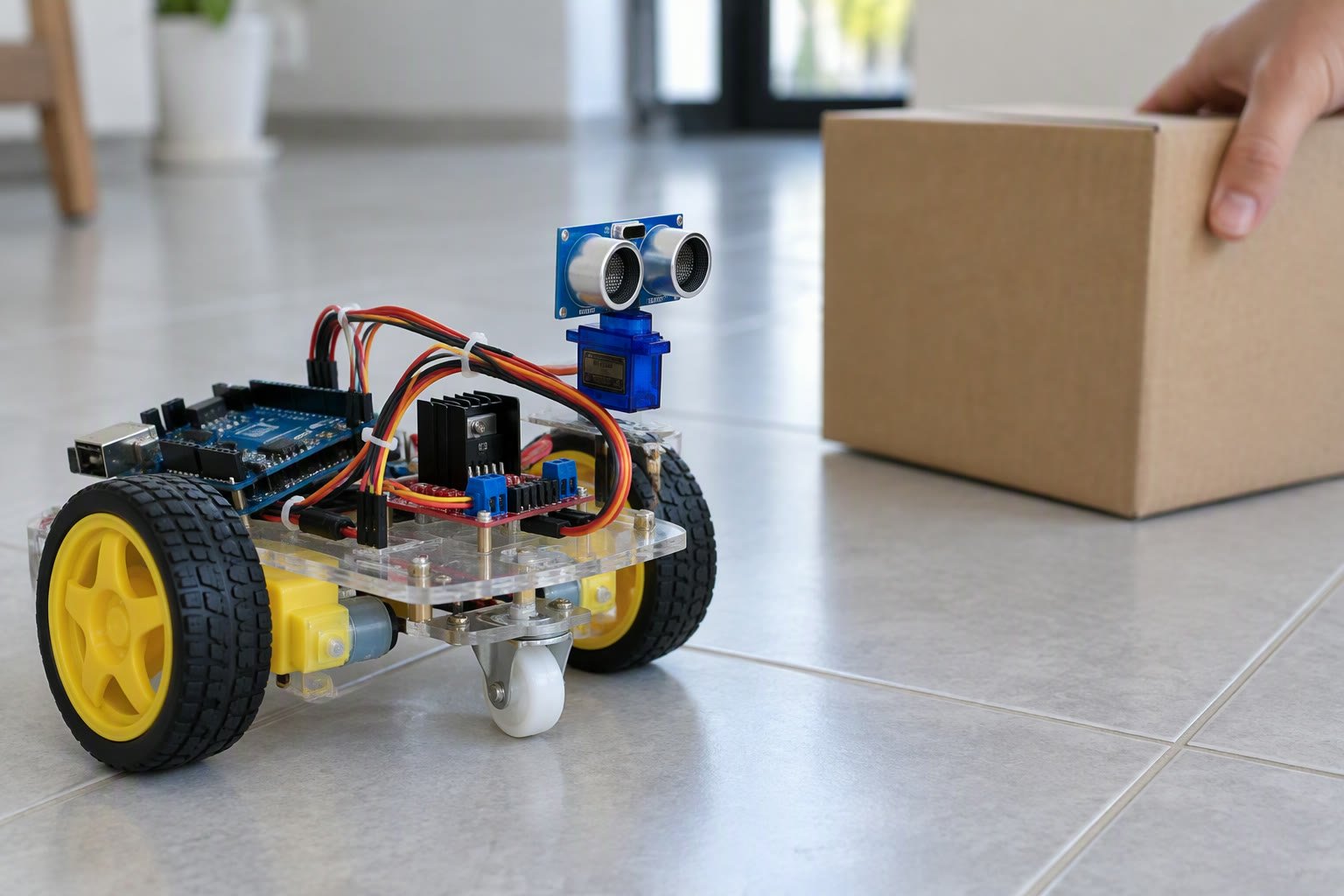
The electronics are deliberately boring. One Arduino Uno or Nano, one HC-SR04, one micro servo to sweep the sensor, one L298N or TB6612FNG driver, two geared DC motors and a battery pack that can supply the motors without browning out the board.
| Connection | Arduino pin | Notes |
|---|---|---|
| HC-SR04 Trig | D9 | Send a 10 microsecond pulse |
| HC-SR04 Echo | D10 | Input, 5 V tolerant on Uno |
| Servo signal | D11 | Powered from a separate 5 V supply, not the board |
| Left motor driver | D5, D6 | PWM speed plus direction |
| Right motor driver | D3, D4 | PWM speed plus direction |
| Common ground | GND | Battery negative, driver ground and board ground tied together |
Power is the most common reason a working bench prototype fails on the floor. Servos draw current spikes of several hundred milliamps when they start moving, and motor stalls draw amps. If the 5 V rail sags, the board resets mid-turn and the robot behaves as if it has a mind of its own. Use a separate regulator for logic and a battery pack sized for stall current, as covered in how to power a robot.
A decision loop that does not freeze
The naive loop reads the distance once, drives forward, and turns when the value drops below a threshold. That works in an empty room and fails in a corner, because the robot turns into the second wall and oscillates. A better loop sweeps the sensor, compares three sectors and commits to the clearest one.
#include <Servo.h>

Servo scan;
const int trigPin = 9, echoPin = 10;
const int leftFwd = 5, leftBack = 6, rightFwd = 3, rightBack = 4;

long measureCm() {
  digitalWrite(trigPin, LOW);
  delayMicroseconds(2);
  digitalWrite(trigPin, HIGH);
  delayMicroseconds(10);
  digitalWrite(trigPin, LOW);
  long us = pulseIn(echoPin, HIGH, 25000);   // 25 ms timeout
  if (us == 0) return -1;                    // no echo: unknown
  return us / 58;
}

int lookAt(int angle) {
  scan.write(angle);
  delay(250);                                // let the servo settle
  long best = -1;
  for (int i = 0; i < 3; i++) {              // median of three
    long d = measureCm();
    if (d > 0 && (best < 0 || d < best)) best = d;
    delay(30);
  }
  return best;
}

void drive(int l, int r) {
  digitalWrite(leftFwd, l > 0); digitalWrite(leftBack, l < 0);
  digitalWrite(rightFwd, r > 0); digitalWrite(rightBack, r < 0);
  analogWrite(leftFwd, abs(l)); analogWrite(rightFwd, abs(r));
}

void loop() {
  int front = lookAt(90);
  if (front < 0 || front > 35) { drive(150, 150); return; }

  drive(0, 0);
  int left = lookAt(150);
  int right = lookAt(30);

  if (left > right) { drive(-120, 120); delay(450); }
  else               { drive(120, -120); delay(450); }
  drive(0, 0);
}
Three details matter more than the code itself. The timeout stops pulseIn from blocking for a second when there is no echo. Taking the minimum of three readings rejects the occasional wild value caused by cross-talk or a soft surface. Stopping before turning prevents the robot from scraping a wall while the servo sweeps.
Why robots get stuck anyway
Watch a beginner robot for ten minutes and the failure modes repeat. Each one has a mechanical or logical cause that is cheap to fix.
| Symptom | Usual cause | Fix |
|---|---|---|
| Spins in place forever | Both sectors read similar distances in a corner | Add a short reverse before choosing a side |
| Hits thin chair legs | Narrow cone misses the leg until too late | Lower the sensor height or add a second sensor at wheel level |
| Ignores glass and curtains | No echo returned | Treat “no echo” as blocked, not clear |
| Resets when motors start | Supply sag on the logic rail | Separate regulators, add bulk capacitance |
| Drifts into one wall | Unequal motor speeds or wheel slip | Calibrate a trim factor, check caster drag |
| Jitters at a threshold | Single reading crossing the limit repeatedly | Hysteresis: stop at 35 cm, resume only above 50 cm |
Hysteresis is the single cheapest upgrade. Instead of one threshold, use two: stop when the front distance falls below 35 cm, and only resume forward motion when it rises above 50 cm. The robot stops twitching at the boundary and looks deliberate.
Making it look competent
Three changes separate a demo from something you would show a teacher or a customer.
- Slow down near obstacles. Scale PWM with distance instead of switching between full speed and stop. Approach speed is what makes a robot look crude.
- Remember the last turn. If the robot turned left, bias the next choice slightly left for a second. This breaks corner oscillation without any mapping.
- Add a second sensor. A fixed sensor pointing 30 degrees to one side catches the wall the sweeping sensor already passed. Two sensors and no servo is often better than one sensor on a servo.
If you want the robot to follow a wall at a constant distance instead of wandering, that is a different control problem and the wall following robot guide covers the proportional control. For line following, the PID line follower explanation is the right starting point.
Getting stable distance readings
Most “my sensor is broken” reports are a timing or mounting problem. Mount the sensor at least 2 cm clear of the chassis so the outgoing pulse does not reflect off your own robot. Keep the trigger and echo wires short and away from motor leads. Fire sensors one at a time, never simultaneously. If readings jump between plausible and zero, the guide to fixing jumping HC-SR04 readings walks through the electrical causes in order.
For anything beyond a school project, treat the ultrasonic reading as one weak vote rather than the truth. The page on getting reliable distance from an HC-SR04 explains filtering, and comparing lidar, ultrasonic and IR sensing shows when a different sensor is the honest answer.
A test plan before you call it done
Test in this order, because each stage assumes the previous one works.
- Bench: wheels off the ground, confirm each motor turns the right way and the servo sweeps without resetting the board.
- Open floor: place a box at 1 m and confirm the robot stops, turns and continues. Repeat ten times; note how often it fails.
- Corner: drive it into a right-angled corner and watch whether it escapes within ten seconds.
- Clutter: add chair legs, a cable and a cloth. Expect the cloth to fail; decide whether that matters for your use case.
- Endurance: run for twenty minutes and watch for resets, drifting and a hot motor driver.
Write down the failure count at each stage. That number is your baseline, and every change after it should reduce it. This is also exactly the kind of measured evidence a robotics portfolio needs, far more convincing than a video of one successful run.
Where to take it next
Once the robot reliably avoids obstacles, the natural upgrades are encoders and a proper controller. Wheel encoders let you measure distance travelled instead of guessing from time, which the wheel encoder guide covers. Bluetooth or Wi-Fi control is a separate, easier project and the Bluetooth robot car build is the shortest path to a phone-controlled version.
If you are choosing a motor driver for the build, the comparison of the L298N and TB6612FNG explains why the smaller board is usually the better choice at this power level. And if you have not bought parts yet, the list of Arduino projects for beginners puts this build in order with the others.
How far can an HC-SR04 detect an obstacle?
Reliably about 2 metres, with usable readings to roughly 4 metres in still air. Beyond that the echo is weak and the readings become noisy, so plan the robot's stopping distance well inside the reliable range.
Why does my robot stop for no reason in an empty room?
Usually a missed echo, cross-talk from a second sensor, or a supply sag that resets the board. Log the raw distance values over serial before changing the code.
Should I use a servo to sweep the sensor or two fixed sensors?
Two fixed sensors are faster, cheaper and more reliable for simple avoidance. A servo sweep is only worth it when you need to compare three directions before choosing a turn.
Can I run the motors and the Arduino from the same battery pack?
Yes, if the pack voltage suits the driver and you regulate a clean 5 V rail for the board and servo. The problem is current, not voltage, so size the pack for motor stall current plus the servo spikes.
How do I stop the robot hitting glass?
Ultrasonic sensing cannot see glass reliably. Add a bumper switch, a short-range IR sensor, or treat a missing echo as an obstacle. No amount of code fixes a sensor that gets no reflection.
Random reboots during motor starts are usually sag, explained in the battery sizing and voltage sag guide.
Sources and further reading
- Arduino pulseIn reference — timing behaviour and timeout parameter.
- Arduino Servo library — servo timing and pin notes.
- HC-SR04 datasheet — beam angle, range and timing specification.
- Robotics Stack Exchange — practical sensor and control questions.

