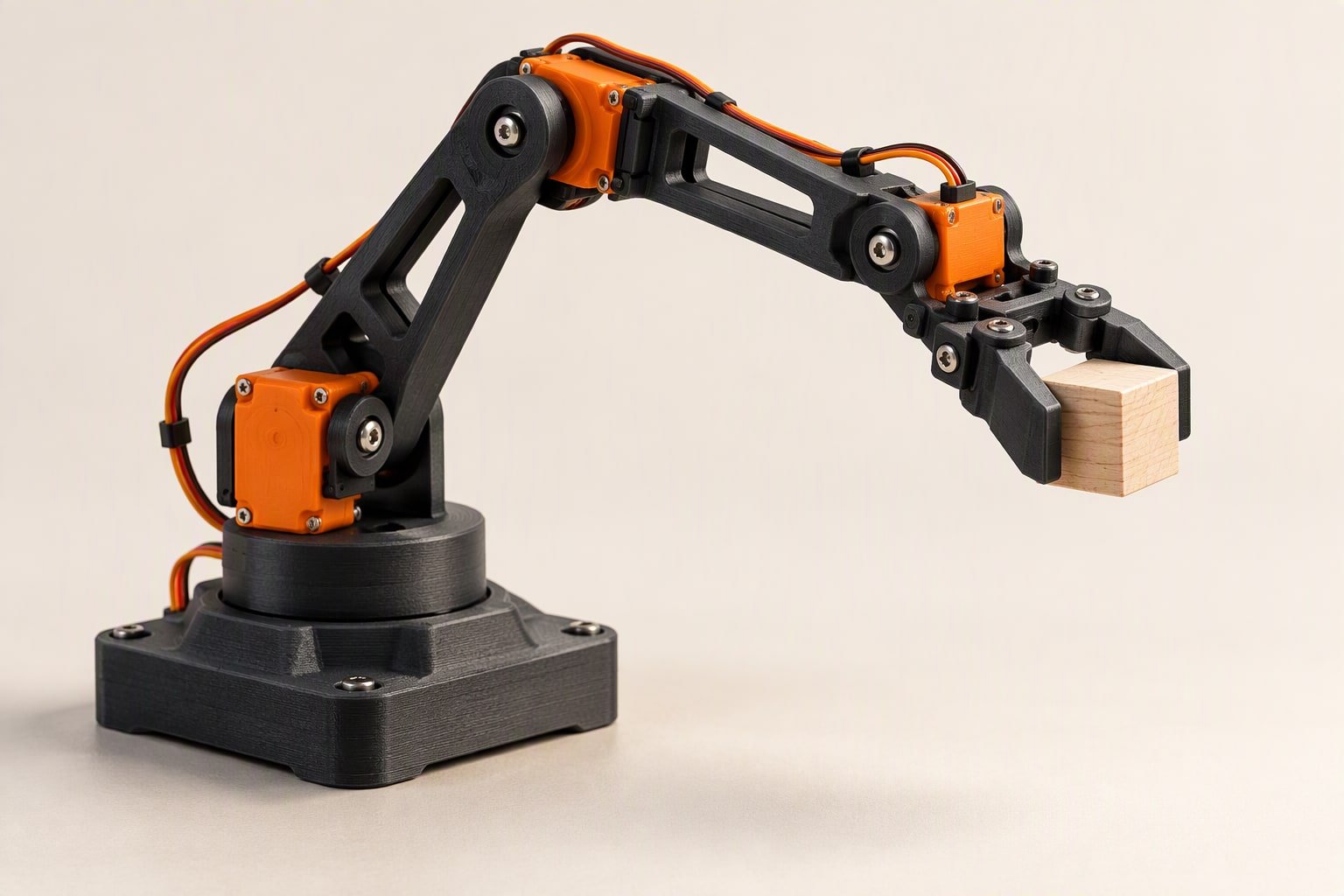
Size the shoulder servo before you buy anything else. A 200 g payload held 300 mm from the shoulder needs about 8.3 kgf·cm at that joint before any safety margin, so an SG90 cannot do the job and an MG996R will struggle at full stretch. Shorten the arm, then pick servos, then pick the driver board. That is why I would size this pick and place robot around torque before choosing any other part.
This build is a four-joint arm with a separate gripper servo, driven through a PCA9685 board from an Arduino. It picks a light object from one marked square and puts it down on another. No encoders, no feedback, no inverse kinematics: you move the arm by hand once, store the poses and replay them.
What four degrees of freedom gets you
Four joints move the arm, and a fifth servo opens and closes the gripper. That is enough for pick and place over a flat table within a reachable arc. It is not enough to keep a tool vertical through the whole motion, and it cannot feel how hard it is gripping.
| Joint | Motion | Typical servo | What it carries |
|---|---|---|---|
| Base | Rotation about the vertical axis | MG996R | Everything above it, plus the lifting moment of the arm |
| Shoulder | Raises and lowers the whole arm | MG996R | The highest torque in the build |
| Elbow | Folds the forearm | MG996R | Payload plus the forearm, at a shorter lever |
| Wrist | Tilts the gripper | SG90 | Payload plus gripper, at a short lever |
| Gripper | Opens and closes the jaws | SG90 | Only the gripping force |
Torque: a worked example for the shoulder
Torque at a joint is the weight of everything outboard of it, multiplied by the horizontal distance from the joint to that weight’s centre of mass. Two contributions matter: the payload at the end of the link, and the link itself, whose mass acts halfway along.
Take a 200 g payload, a 300 mm reach and a 150 g forearm with its centre of mass at 150 mm. The moment is 0.20 × 0.30 + 0.15 × 0.15 = 0.0825 kg·m. Multiply by 9.81 to get 0.809 N·m, which is 8.25 kgf·cm. Apply a safety factor of 1.5 for acceleration and friction and you need about 12.4 kgf·cm.
An MG996R is commonly listed around 9 to 11 kgf·cm at 6 V, so that arm is too long. Cut the reach to 220 mm: 0.20 × 0.22 + 0.15 × 0.11 = 0.0605 kg·m, which gives 0.593 N·m or 6.05 kgf·cm, and 9.1 kgf·cm with the margin. Now the servo fits, with little to spare. Put your own numbers into the servo torque calculator before you cut any acrylic.
Two habits keep this honest. Measure the link mass on a kitchen scale rather than trusting a datasheet, and check the servo’s rating at the voltage you will actually supply. A servo rated at 6 V gives noticeably less at 5 V, and the stall torque on the box is not the torque it holds comfortably all afternoon.
Servo power budget for a pick and place robot
Servo current is spiky. A metal-gear servo can pull a couple of amps for a fraction of a second when it starts or stalls, even though it averages a few hundred milliamps while moving. Four joints starting together can ask for more than a small supply can give, and the symptom is an Arduino that resets mid-move.
- Supply: 6 V at 5 A is a realistic bench supply for three MG996R servos and two SG90s. A 5 V 2 A phone charger is not, even though it powers the Arduino fine.
- Bulk capacitor: 1000 µF across the servo rail, close to the PCA9685 terminal, absorbs the startup spike.
- Wiring: 18–20 AWG for the servo rail. Thin dupont jumpers drop voltage and get warm.
- Sequencing: move one joint at a time in the replay code. The motion looks deliberate and the current stays inside the supply’s rating.
- Never power servos from the Arduino 5 V pin. The regulator is rated for logic, not for four motors.
PCA9685 or direct pins?
| Approach | Step size | Channels | Pins used | Pick it when |
|---|---|---|---|---|
| Uno pins with the Servo library | 1 µs, the finest you get on an AVR | Up to 12 in the library, limited by timers | One per servo | Two or three servos, quick test, no extra board |
| PCA9685 over I2C | About 4.9 µs per count at 50 Hz | 16 | Two: SDA and SCL | Four or more servos, one power terminal, tidy wiring |
That comparison surprises people who expect the expander to be more precise. It is not, at 50 Hz. What it gives you is sixteen channels on two wires, a screw terminal that all servo power can share, and no argument with the Servo library over timers. For a four-joint arm with a gripper, that is the right trade.
Wire SDA to A4 and SCL to A5 on an Uno, VCC to 5 V, GND to ground, and the servo rail to the separate 6 V supply with the grounds joined. The board answers at I2C address 0x40 unless you have changed it. The logic supply sets the signal level: power VCC from 5 V and the outputs are 5 V, from 3.3 V and they are 3.3 V. The servo rail is separate, so check one servo before wiring all five.
Teach and repeat without encoders
Hobby servos have no position feedback, so the arm cannot know where it is. Two practical ways around that: four potentiometers that act as a manual teaching pendant, or typed commands over serial. The potentiometer route is easier to demonstrate and needs no app.
// Teach mode: four potentiometers set the pose, a button stores it.
// Wiring: pots on A0-A3, button on D2 to GND, PCA9685 on A4/A5.
// Servo rail from a separate 6 V supply. Grounds joined.

#include <Wire.h>
#include <Adafruit_PWMServoDriver.h>
Adafruit_PWMServoDriver pwm = Adafruit_PWMServoDriver();

const int POT[4]  = {A0, A1, A2, A3};
const int CH[4]   = {0, 4, 8, 12};        // base, shoulder, elbow, wrist
const int BUTTON  = 2;
const int PULSE_MIN = 205, PULSE_MAX = 410;   // 1 ms to 2 ms at 50 Hz
const int STEPS = 6;

int pose[STEPS][4];
int stored = 0;

void setup() {
  pwm.begin();
  pwm.setPWMFreq(50);
  pinMode(BUTTON, INPUT_PULLUP);
}

void loop() {
  int angle[4];
  for (int j = 0; j < 4; j++) {
    angle[j] = map(analogRead(POT[j]), 0, 1023, 10, 170);   // soft limits
  }

  if (digitalRead(BUTTON) == LOW && stored < STEPS) {
    for (int j = 0; j < 4; j++) pose[stored][j] = angle[j];
    stored++;
    delay(400);                            // one press, one pose
  }

  for (int j = 0; j < 4; j++) moveTo(j, angle[j]);
}

void moveTo(int joint, int deg) {
  int pulse = map(deg, 0, 180, PULSE_MIN, PULSE_MAX);
  pwm.setPWM(CH[joint], 0, pulse);
}

// Replay is the same moveTo() called with pose[n][j], one joint at a time,
// with a 600-900 ms wait between moves so the supply is not loaded by all four.
The map range of 10 to 170 degrees is a soft limit, not a safety system. Set it so no joint can drive into the frame at either end, then check each joint by hand with the power off before you run the replay. A servo pushing against a hard stop buzzes, heats and eventually strips a gear.
Gripper choices and limit handling
- Parallel jaw with an SG90. Two printed fingers on a rack, driven by a horn. Cheapest option and enough for a 200 g block. The SG90 guide covers its torque and current.
- Two-finger linkage with a stronger servo. More grip force for a heavier object, at the cost of a heavier wrist.
- Fixed jaw plus a moving finger. Fewer parts to align, and the object stays against a known face, which makes placement repeatable.
- Suction cup. Excellent on flat, non-porous objects, useless on cloth or rough surfaces, and it needs a pump or a vacuum line.
Grip force cannot be measured without a sensor, so handle it mechanically. Put a soft pad on each jaw, close the gripper for a fixed time rather than until it stalls, and set the closed angle so the jaws stop just short of touching. If the object slips, increase friction, not the closed angle. For position limits, the order is: mechanical stop, then soft limit in code, then a current limit if your supply has one. Hobby servos will happily try to push through the first two. The gripper is where a pick and place robot meets the object, so its choice and its limits need as much care as the shoulder.
If a four-joint arm is more than you want to build first, the 3-DOF arm project covers the same ideas with one less joint and a much smaller bill.
What it costs
| Item | Planning price (INR) |
|---|---|
| Arduino Uno clone | ₹450–700 |
| PCA9685 16-channel servo driver | ₹250–400 |
| MG996R servos, three | ₹1,050–1,650 |
| SG90 servos, two, for wrist and gripper | ₹300–500 |
| 6 V 5 A supply | ₹600–1,000 |
| Frame, brackets, acrylic or printed links | ₹600–1,500 |
| Base bearing, horns, screws, pot knobs | ₹250–500 |
| 1000 µF capacitor and power wiring | ₹150–250 |
| Total | ₹3,650–6,500 |
The frame is the line that varies most, and scrap plywood or aluminium angle can halve it. Add shipping, a spare servo horn and the potentiometers with the project cost calculator before you order.
This build sheet is reviewed against datasheets and vendor listings; test your own robot before relying on it. Test one servo on the bench, then one joint under load, then the full arm with the supply’s current limit set low.
Common questions
Can I drive five servos from an Arduino Uno without a PCA9685?
Yes. The Servo library handles up to 12 servos on an Uno, and five is comfortable. You still need a separate servo supply and a common ground. The expander becomes worth its price when you want tidy power distribution, more channels, or the timers left free for other work.
Why does the arm sag when it holds an object?
The shoulder servo is at or past its rated torque, or the supply is dropping under load. Check the supply voltage at the servo terminal while the arm holds the object. If it holds 6 V, the joint is simply too weak for that reach and payload.
Do I need inverse kinematics for pick and place?
Not for a taught sequence. Store the poses, replay them in order and the arm repeats the motion as long as nothing moves the base. Add kinematics later if you want to give a coordinate instead of a taught pose; that is a report chapter, not a first build.
The arm angles in this build come from trigonometry; the robot arm kinematics guide derives them and shows how to verify each move.
The end effector deserves its own design pass: the gripper design guide covers grip force, pad material and vacuum cups.
A hobby arm is a small version of the same choice: hydraulic vs pneumatic vs electric actuation.
A hobby arm is a lesson in end effector design.
A multi-servo arm draws stall current on several channels at once, which is the usual source of servo jitter.
Hobby jams have the same cause as industrial ones, explained in the robot gripper buying guide.
To command positions instead of angles, add the inverse kinematics solution to the firmware.
A hobby arm can still use suction, and sizing the cups matters more than the pump.
The Arduino pick and place arm can be air driven, and the cylinder sizing guide covers the numbers.
Scaling that project into a cell means a conveyor and a handshake, covered in the conveyor integration guide.
Sources and further reading
Documents used to check the numbers on this page:
- Arduino Servo library — pulse timing and attach() behaviour.
- Arduino servo motor guide — wiring and power notes.

