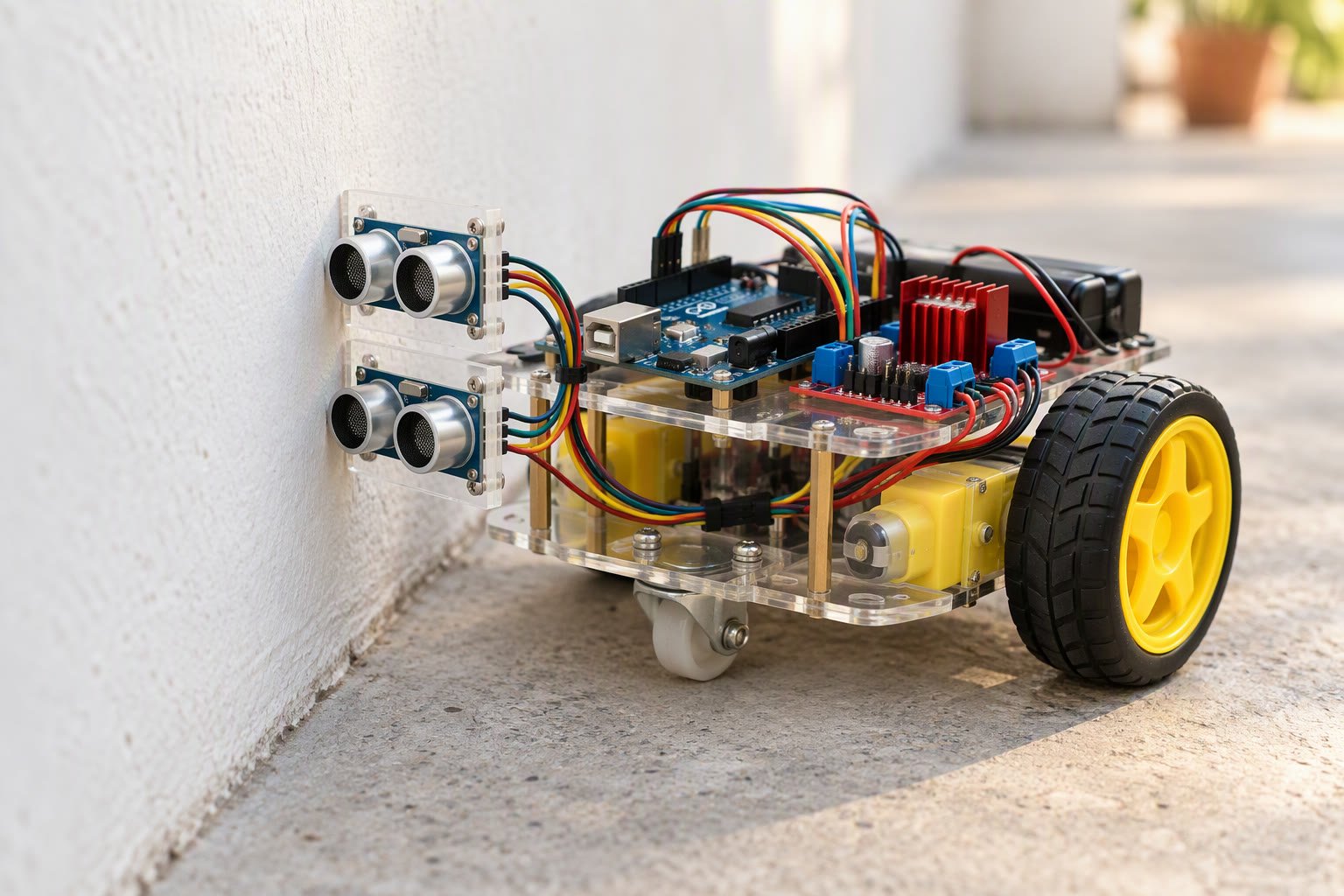
Put one HC-SR04 on the side of the robot, aim it at the wall, and steer on the difference between the distance you want and the distance you measure. Proportional steering removes the left-right chatter of a bang-bang follower and holds a line down a corridor. Mount the sensor 10 to 15 cm above the floor, square to the wall, and feed the loop a fresh distance every 60 to 80 ms. That is the core of a wall following robot: measure one distance, compare it with the one you want and steer on the difference.
How the loop decides where to go
Two numbers run the robot: the distance you want and the distance the sensor reports. Subtract the second from the first and you have an error. You want 20 cm and the sensor reads 26 cm, so the error is 6 cm and the robot is too far from the wall. It should ease towards the wall, not snap towards it.
The correction is a steering value you add to one wheel and subtract from the other. With the wall on your left, a positive error means the left wheel slows and the right wheel speeds up, so the robot arcs towards the wall. A negative error does the opposite. The base speed stays constant, so the robot keeps moving forward while it corrects.
Where to mount the sensor on a wall following robot
The HC-SR04 does not measure a line. It fires a cone roughly 15 degrees wide and reports the nearest surface inside it, from about 3 cm to about 250 cm in practice. That shape decides where you put it: a chair leg inside the cone becomes a wall, and a curtain absorbs the pulse and returns nothing.
- Height: 10 to 15 cm above the floor keeps the cone above carpet pile and below most table tops and skirting boards.
- Angle: the face of the sensor should be parallel to the floor and square to the wall. Angled 10 degrees forward, it reads a longer distance than the true perpendicular gap.
- Offset: measure the sideways distance from the sensor face to the line between your wheels and write it down. Your target is from the sensor, not the chassis edge.
- Rigidity: a bracket that flexes on every bump adds noise to every reading. Two standoffs and an acrylic plate beat hot glue.
- One sensor or two: a front sensor aimed ahead is worth adding for a corridor with furniture. It stops the robot before it drives into a box the side sensor never sees.
The HC-SR04 guide covers the trigger timing and the failure modes in more detail.
Why bang-bang makes the robot wobble
The first version most people write is a two-state rule: if the distance is above target, turn one way, otherwise turn the other. It works on a bench and fails in a corridor, because the robot is always either correcting too much or crossing back. The average distance ends up wrong and the chassis visibly hunts left and right.
| Steering rule | What it does | What you see on the floor | Use it when |
|---|---|---|---|
| Bang-bang | Full correction above or below target | Constant left-right chatter, poor average distance | Almost never on a smooth wall |
| Proportional | Correction scales with the error | Smooth arc back to the setpoint, some overshoot at speed | First working version of any follower |
| Proportional plus derivative | Adds a term on how fast the error is changing | Less overshoot, tighter hold at higher speed | The robot runs faster than a slow walk |
| Proportional plus integral | Accumulates small errors and removes the steady offset | Holds the target on a long corridor with mismatched motors | You have already trimmed the mechanics |
Sampling rate has to keep up with your speed
An HC-SR04 reading takes tens of milliseconds, and the module needs a gap between readings or the previous echo bleeds into the next one. Budget about 50 ms per clean reading. Now do the arithmetic that matters: at 0.3 m/s the robot travels 15 mm between readings, and at 0.5 m/s it travels 25 mm. Every correction you compute is already describing a position the robot has left. A wall following robot that reads its distance too slowly will correct late, so the sampling interval has to match how fast it drives.
Two habits follow from that. Read the sensor once per loop instead of calling it three times for one decision. Then slow the robot down before you tune the gains: a follower at 0.25 m/s with a 60 ms loop behaves far better than the same code at 0.5 m/s, and you can raise the speed once the steering is stable. Set the pulse timeout to 25 ms so a missing echo returns in bounded time instead of stalling the loop.
Why does the robot drift down the corridor?
Drift is usually mechanical before it is mathematical. Two motors on the same PWM value rarely turn at the same speed, so the robot curves away from the wall and the controller spends its whole time correcting one direction. Drive the robot in open space with both channels at your base speed and watch which way it curves, then trim the slower channel up by a few counts. A sensor mounted 2 cm further forward than you measured also shifts the setpoint, because the wall is now at an angle to the beam.
Long corridors add a second effect: a small constant error that never quite reaches zero. A clamped integral term removes it, but keep the clamp tight, because a wind-up while the robot is pushed against a wall will throw it sideways when it is freed. Walls are also not parallel; a corridor that narrows by 3 cm over 4 m is normal in a college building, and a proportional term follows it without complaint.
Corners are where followers fail visibly, and each shape needs a decision written into the code:
- Inside corner: the wall suddenly ends and the reading jumps to out of range. Hold the last valid distance for a moment and keep steering towards the wall, otherwise the robot swings away at the exact moment it should turn.
- Outside corner: the gap opens up and the error grows large. Cap the steering value so the robot turns at a sane rate instead of spinning.
- Doorway or gap: the wall disappears for a metre. Treat a lost echo as “too far”, steer gently towards the opening, and give up after a set time rather than hunting forever.
- Clutter: a pipe, radiator or skirting board changes the profile at sensor height. Test the route with the sensor at the height you plan to use, not on a clean lab wall.
A code skeleton you can build on
This is the shape of the loop for a wall on the left, an L298N driver and an Arduino Uno. It drives, reads, steers and repeats; it does not try to be clever about corners until you have seen it run.
// Wall on the left. HC-SR04 side-mounted, L298N dual driver, Arduino Uno.
const uint8_t TRIG = 9, ECHO = 10;
const uint8_t ENA = 5, IN1 = 6, IN2 = 7;    // left motor
const uint8_t ENB = 3, IN3 = 8, IN4 = 11;   // right motor

const int   TARGET_CM = 20;                 // distance from the sensor face
const float KP = 14.0, KD = 5.0;
const int   BASE = 110, MAX_TRIM = 85;

float lastError = 0;

float readCm() {
  digitalWrite(TRIG, LOW);  delayMicroseconds(2);
  digitalWrite(TRIG, HIGH); delayMicroseconds(10);
  digitalWrite(TRIG, LOW);
  unsigned long us = pulseIn(ECHO, HIGH, 25000);  // 25 ms timeout
  if (us == 0) return -1;                         // no echo
  return us / 58.0;                               // microseconds to cm
}

void drive(int left, int right) {
  left  = constrain(left,  -255, 255);
  right = constrain(right, -255, 255);
  digitalWrite(IN1, left  >= 0); digitalWrite(IN2, left  < 0);
  digitalWrite(IN3, right >= 0); digitalWrite(IN4, right < 0);
  analogWrite(ENA, abs(left));   analogWrite(ENB, abs(right));
}

void loop() {
  float d = readCm();
  if (d < 0) { drive(BASE, BASE / 3); delay(80); return; }  // lost wall

  float error = d - TARGET_CM;                 // positive = too far away
  float steer = KP * error + KD * (error - lastError);
  steer = constrain(steer, -MAX_TRIM, MAX_TRIM);
  lastError = error;

  drive(BASE - steer, BASE + steer);           // arc towards the wall
  delay(60);                                   // about one reading per loop
}
This build sheet is reviewed against datasheets and vendor listings; test your own robot before relying on it.
What the parts cost
| Part | Planning range | Note |
|---|---|---|
| Arduino Uno clone | ₹450–750 | A Nano at ₹250–450 is enough and saves space |
| Two TT geared motors with wheels | ₹150–300 | Buy them as a matched pair if you can |
| L298N module | ₹130–250 | Adds 1.4–2 V of drop; fine for a slow follower |
| HC-SR04 | ₹70–150 | Order two, the spare tells you if one is faulty |
| Two-wheel chassis with castor | ₹200–450 | Acrylic kits are fine; check the motor mounts |
| 2S 18650 pack, holder and BMS | ₹250–550 | Charger is extra and not optional |
| Switch, wires, standoffs | ₹100–200 | Include a fuse holder |
A working follower usually lands between ₹1,400 and ₹2,600 depending on what you already own. Work out the runtime before you pick the pack with the battery runtime calculator, and if this is your first chassis, build the line follower first because it teaches the same motor mixing with one sensor instead of two.
Common questions
Should the sensor point at the wall or down the corridor?
At the wall, so the distance you control is the gap you care about. A forward-facing sensor measures what is ahead, which is useful as a second sensor for obstacles but useless for holding a line along a wall.
Can I follow a wall on the right instead?
Yes, and the only change is the sign of the steering term: swap the two motor arguments in the drive call. Keep the target distance the same and re-tune the gains, because the sensor offset from the wheel line changes.
Will it work in a curved corridor?
Up to a point. The robot can follow a gentle curve indefinitely because the error stays small. On a tight bend the required turn rate exceeds what your capped steering allows, the wall leaves the cone, and the lost-echo branch takes over. Slow down for tight bends and cap the steering at a value the chassis can actually hold.
Last reviewed: October 2026. Prices are Indian retail planning ranges and exclude shipping, a charger and tools.
If the robot still misses obstacles, the distance sensor comparison explains the blind spots of each sensor.
Avoidance and wall following are different behaviours; combine them by starting with the avoidance loop.
Sources and further reading
Documents used to check the numbers on this page:
- Arduino analog output (PWM) reference — how analogWrite() behaves.
- Arduino attachInterrupt() reference — which pins can interrupt.

