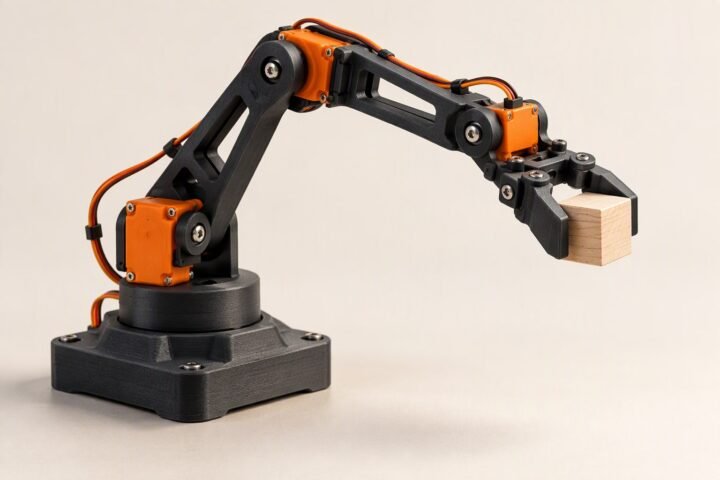
A ₹1,485 servo gripper you open and close with a knob. A hobby claw kit is driven by one SG90-class servo, and a potentiometer sets how far it closes. The Arduino reads the knob, limits the angle to a safe range, smooths the motion and writes it to the servo. The page includes the wiring, a separate servo supply, a complete sketch, a method to find the safe jaw limits, and a test plan for stalls and jitter.
Scope: beginner. This is a design worksheet with illustrative costs. It has not been bench-tested by this site, and the angle limits in the sketch are placeholders that you must find on your own claw. A servo that is told to close further than the jaws can go will stall against them, draw high current and can strip its gears, so the limits matter more than the code.
How it behaves
The potentiometer wiper gives a voltage between 0 and 5 V, which the Uno reads as 0 to 1023. The sketch maps that range onto a closed-to-open angle that you have measured, then moves the servo toward the target in small steps rather than jumping. The result is a gripper that follows the knob smoothly and never asks the jaws to go past their ends.
Bill of materials
| Part | Qty | Unit | Total |
|---|---|---|---|
| Arduino Uno R3 | 1 | ₹520 | ₹520 |
| Gripper claw kit | 1 | ₹250 | ₹250 |
| SG90-class servo | 1 | ₹130 | ₹130 |
| 10 kΩ potentiometer | 1 | ₹25 | ₹25 |
| Small breadboard | 1 | ₹60 | ₹60 |
| Jumper wire set | 1 | ₹50 | ₹50 |
| 5 V 2 A buck converter | 1 | ₹220 | ₹220 |
| 2×18650 holder with cells | 1 | ₹200 | ₹200 |
| Switch | 1 | ₹30 | ₹30 |
| Parts total | ₹1,485 | ||
Scroll the table sideways to see every column.
Prices checked Nov 2026. Shipping and tools are not included.
Prices are illustrative figures for Indian sellers in November 2026, before shipping, and have not been checked against current listings. The buck converter is part of the build, not an extra: it gives the servo its own 5 V rail, as the next section explains.
Power and wiring
| Part | Arduino Uno | Note |
|---|---|---|
| Potentiometer ends | 5V and GND | Outer pins |
| Potentiometer wiper | A0 | Middle pin |
| Servo signal | D9 | Orange or yellow wire |
| Servo VCC | Buck converter 5 V output | Not the Uno 5V pin |
| Servo GND | Common GND | Join to the buck converter and Uno grounds |
| Battery | Buck converter input and Uno Vin | 2S pack through the switch; the Uno can also run from USB while testing |
A small servo can pull far more current when it starts or stalls than the Uno’s regulator should supply. Powering it from the Uno’s 5 V pin is the usual cause of resets and jitter; see servo jitter and twitching. Give the servo its own rail, and join all the grounds.
Find the safe limits first
- Before fitting the horn, power the servo and send it to 90 degrees with a tiny test sketch. Fit the horn so the claw is about half open.
- With the servo powered, send small angle steps one at a time, for example 10 degrees apart, and watch the jaws. Stop as soon as the jaws touch or the servo starts to strain or hum.
- Write down the angle for fully open and the angle for just closed on nothing. Back each off by a few degrees. Those are
OPEN_ANGLEandCLOSED_ANGLE. - Only then run the full sketch.
The sketch
// Potentiometer-controlled servo gripper: Uno + SG90-class servo + 10k pot
// Design worksheet: measure OPEN_ANGLE and CLOSED_ANGLE on your own claw first.

#include <Servo.h>

const int POT_PIN = A0;
const int SERVO_PIN = 9;

const int OPEN_ANGLE = 120;     // placeholder: fully open, backed off from the stop
const int CLOSED_ANGLE = 60;    // placeholder: closed on nothing, backed off from the stop
const int STEP = 2;             // degrees per update
const int UPDATE_MS = 15;

Servo gripper;
int current = (OPEN_ANGLE + CLOSED_ANGLE) / 2;

void setup() {
  Serial.begin(9600);
  gripper.attach(SERVO_PIN);
  gripper.write(current);
  delay(500);
}

void loop() {
  int raw = analogRead(POT_PIN);
  int target = map(raw, 0, 1023, CLOSED_ANGLE, OPEN_ANGLE);
  target = constrain(target, min(CLOSED_ANGLE, OPEN_ANGLE), max(CLOSED_ANGLE, OPEN_ANGLE));

  if (abs(target - current) > 1) {
    if (target > current) {
      current = min(current + STEP, target);
    } else {
      current = max(current - STEP, target);
    }
    gripper.write(current);
  }

  Serial.print(raw);
  Serial.print(" ");
  Serial.println(current);
  delay(UPDATE_MS);
}
The step limit makes the jaws move at a steady pace even if you flick the knob. The one-degree dead zone stops the servo twitching when the knob reading flickers by a count or two. If the jaws move the wrong way for your knob, swap the two end angles in the map() call, not the wiring.
Test plan
- Knob range: turn the knob from end to end and confirm the printed raw value spans nearly 0 to 1023 and rises smoothly. A noisy or jumping value points to a loose wiper wire or a worn pot.
- Limits: move the knob to each end slowly. The jaws should stop short of their mechanical ends with no humming.
- Speed: flick the knob. The jaws should follow at a steady rate, not snap.
- Supply: watch the Uno during fast moves. A reset means the servo is on the wrong supply or the grounds are not joined.
- Gripping an object: close the claw on a soft object such as a foam block. The servo will push against it, so note the heat and noise, and do not hold it closed for long.
- Repeatability: open and close ten times and check the jaws return to the same points.
What usually goes wrong
| Symptom | Likely cause | Fix |
|---|---|---|
| Servo hums at the end of travel | Angle limit past the mechanical stop | Back the limits off |
| Servo twitches at rest | Noisy supply or knob reading flicker | Separate servo rail, common ground, keep the dead zone |
| Uno resets when the claw moves | Servo drawing from the Uno 5 V pin | Use the buck converter rail |
| Claw moves the wrong way | Pot or horn orientation | Swap the angles in map() |
| Jaws do not reach full range | Horn fitted off-centre | Refit the horn at the half-open point |
| Servo gets hot while holding | Pushing against an object or stop | Do not hold closed for long; add a force limit |
Upgrades
- Current limit: measure the servo current as in the battery and current monitor and open the jaws if the current stays high.
- Mount it on a robot: fit the claw on the front of a car and drive it with the IR remote car, using spare buttons for open and close.
- Arm: add the claw to the 3-DOF arm.
- Preset positions: add a button that jumps to open and a closed-on-object position.
Cost and parts notes
The ₹1,485 total is an illustration for the parts above and does not include shipping. Gripper kits vary a lot in quality, and cheap plastic claws can flex or bind, so look at the design of the gear train before you buy. Use the cost calculator to compare sellers.
Common questions
Why not power the servo from the Uno?
The servo's start and stall current can exceed what the board's regulator should supply. That causes resets and jitter. A separate 5 V rail with a common ground avoids it.
Can I control two servos with one knob?
Yes, with one more servo on another pin written from the same target. Give each its own limits and watch the total current on the supply.
Why does the servo buzz when I hold an object?
It is pushing against the object to reach the commanded angle. Command a slightly more open angle when holding, or add a current check.
Can I use a larger servo?
Yes, but check its voltage and current needs first. A larger servo needs a bigger supply than the converter in this build.
Last reviewed: November 2026. This is a design worksheet with illustrative costs. It has not been bench-tested by this site; angle limits and speeds are placeholders to find on your own claw, and measurements from your build are welcome.