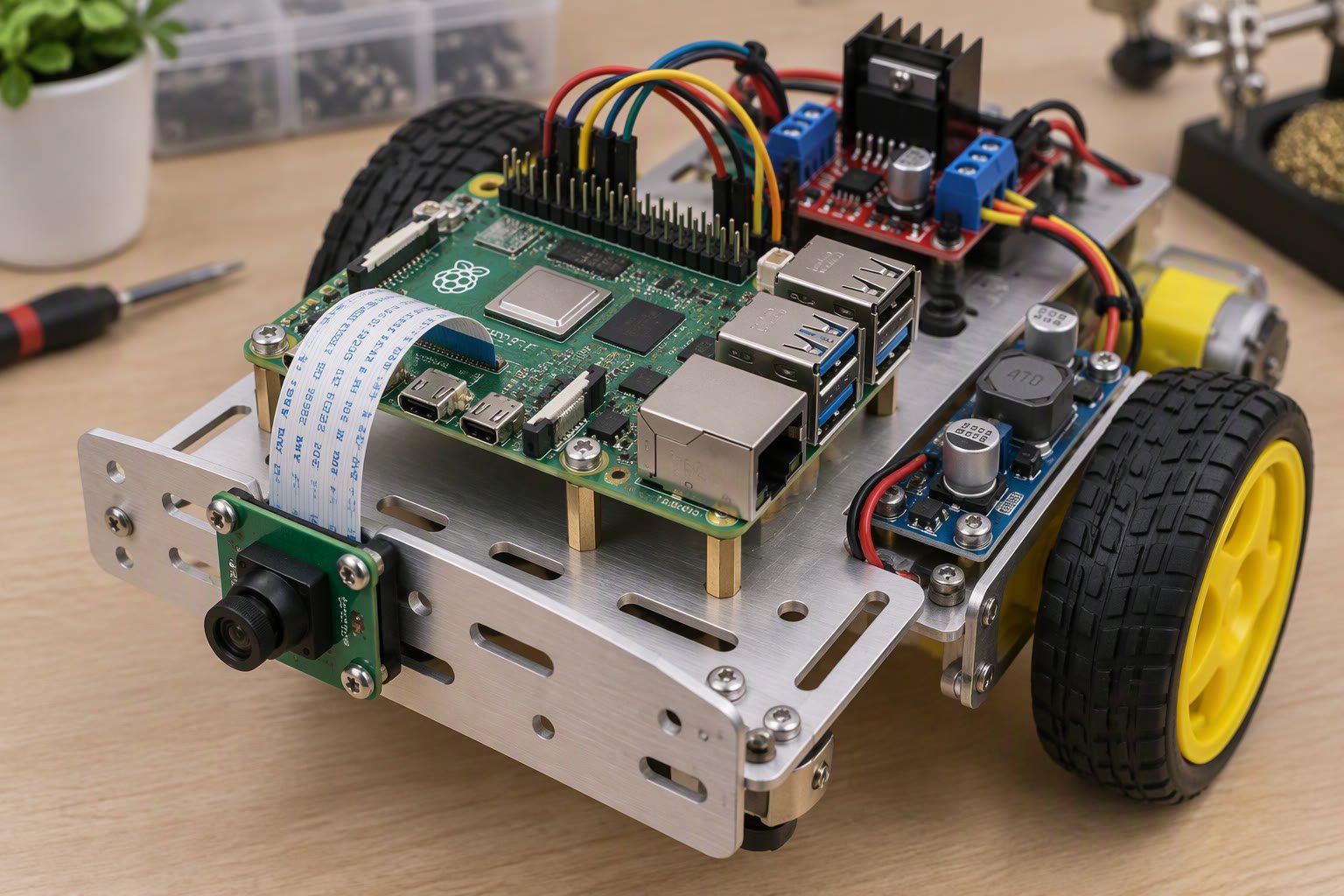
The Raspberry Pi 5 is the first Pi that feels like a robot brain rather than a toy computer. It has enough CPU for vision at usable frame rates, two camera ports, a real-time clock and a PCIe lane. It also has stricter power rules than earlier models, and those rules are where most robot builds go wrong. This guide covers what changed, how to power it, and which jobs belong on the Pi versus a microcontroller.
What is different from a Raspberry Pi 4
| Feature | Raspberry Pi 4 | Raspberry Pi 5 | Why it matters on a robot |
|---|---|---|---|
| CPU | Quad Cortex-A72 at 1.5 GHz | Quad Cortex-A76 at 2.4 GHz | More headroom for vision and planning |
| I/O | Integrated in the SoC | Separate RP1 chip | Faster USB and GPIO handling |
| Camera ports | One CSI | Two four-lane CSI | Stereo vision or front and rear cameras |
| PCIe | None exposed | PCIe 2.0 x1 via FPC | NVMe storage for datasets and logs |
| Power | 5 V at 3 A | 5 V at 5 A over USB-C PD | Needs a proper supply or USB current is limited |
| Power button | None | Yes, with soft shutdown | Safer shutdown on a battery-powered robot |
| Real-time clock | None | Built in, battery header | Timestamps survive power loss |
| Analogue input | None | None | Still needs an ADC for analogue sensors |
The Pi 5 also removed the 3.5 mm analogue audio and video jack. That does not matter for most robots, but it matters if your build used it for a display or audio output.
Power: the part that decides whether your robot is reliable
The Pi 5 wants a 5 V supply that can deliver 5 A. If the supply cannot negotiate USB-C Power Delivery, the board still boots, but USB ports are limited to 600 mA total and you may see a low-voltage warning. On a robot, that usually shows up as a camera that disconnects when the motors start.
- Use a real 5 V 5 A supply for bench work. The official 27 W USB-C supply is the reference.
- On battery, use a DC-DC converter rated for at least 5 A continuous, not a small buck module rated at 3 A peak. Motor inrush and Wi-Fi bursts both exceed steady-state current.
- Power servos and motors from the battery rail, never from the Pi’s 5 V pins. A single MG996R can pull over 2 A at stall.
- Join all grounds at one point. A shared ground is what makes signal levels meaningful.
- Add a capacitor of 470–1000 µF across the motor supply near the driver to absorb inrush dips.
A phone power bank is not a robot power supply. Most cut off below 5 V under load and add a delay when the Pi draws a burst. Use a 2S or 3S lithium pack with a proper converter and a fuse.
Divide the work: Pi for thinking, microcontroller for timing
Linux is not a real-time operating system. A background update or a camera driver can delay a GPIO toggle by milliseconds. That is fine for “turn left” and fatal for “step the motor every 200 microseconds”.
| Job | Run it on | Reason |
|---|---|---|
| Camera capture, vision, object detection | Raspberry Pi 5 | Needs CPU and memory bandwidth |
| Path planning, mapping, SLAM | Raspberry Pi 5 | Needs Linux libraries and storage |
| Wi-Fi, dashboard, logging | Raspberry Pi 5 | Network stack and filesystem |
| Motor PWM and encoder counting | Arduino, ESP32 or Pico | Deterministic timing |
| Emergency stop and limit switches | Microcontroller or hardware | Must not wait for Linux |
| Battery voltage monitoring | Microcontroller | Analogue input and fast response |
The clean architecture is a serial link between the Pi and the microcontroller. The Pi sends short commands such as M 0.4 0.4 for wheel speeds, and the microcontroller sends back encoder counts and battery voltage ten times a second. If the link dies, the microcontroller stops the motors after a timeout. That one rule prevents most runaway robots.
Wiring the Pi into a robot safely
- GPIO is 3.3 V only. Feeding 5 V into a GPIO pin damages the SoC. Use a divider or level shifter for 5 V sensor outputs, including the HC-SR04 echo line.
- There is no analogue input. Add an ADS1115 or MCP3008 over I2C for potentiometers, current sensors or analogue distance sensors.
- Two hardware PWM channels are available on the 40-pin header. For several servos, use a PCA9685 over I2C instead of software PWM.
- Serial console: the primary UART is on GPIO 14 and 15. Disable the serial console in raspi-config before using it to talk to a microcontroller.
- Camera: use the CSI port for low latency and low CPU load. A USB webcam is easier but slower and adds USB power draw.
A working first program
This captures one frame with the CSI camera, saves it, and sends a command over serial. It assumes Raspberry Pi OS Bookworm with Picamera2 and pyserial installed.
from picamera2 import Picamera2
import serial, time

picam2 = Picamera2()
picam2.configure(picam2.create_preview_configuration(
    main={"size": (1280, 720), "format": "RGB888"}))
picam2.start()
time.sleep(1)

frame = picam2.capture_array()
print("frame shape:", frame.shape)

ser = serial.Serial("/dev/ttyAMA0", 115200, timeout=0.2)
time.sleep(0.5)
ser.write(b"M 0.3 0.3\n")
time.sleep(1.0)
ser.write(b"S\n")
print("reply:", ser.readline())
ser.close()
Run it on the bench before it goes on the robot. If the camera fails, check the ribbon orientation and that the connector latch is closed. If serial returns nothing, confirm the console is disabled and that the microcontroller is sending newline-terminated replies.
Cooling, storage and shutdown
The Pi 5 throttles under sustained load. Vision at 1080p will hold the CPU high for minutes, which is exactly the pattern that triggers thermal limiting. Fit the active cooler or a metal case with a fan, and keep the intake clear of the robot frame.
Use a good microSD card or, better, an NVMe drive over the PCIe connector. Dataset logging and video recording wear out cheap cards quickly. Finally, wire the power button or run a shutdown command from your microcontroller before cutting power. Pulling power from a running Linux system corrupts the filesystem sooner or later.
When a Pi 5 is the wrong choice
- You need days of battery life. A Pi 5 idles at a few watts and peaks much higher. An ESP32 or Pico uses a fraction of that.
- You need microsecond timing. Use a microcontroller for the control loop, even if the Pi does the planning.
- The robot must start in under a second. Linux boot takes tens of seconds. A microcontroller boots instantly.
- Cost is the constraint. For a line follower or a simple sumo robot, a Pi is overkill. An Arduino Nano or Pico W does the job for a fraction of the price.
Related: Raspberry Pi robot guide, Pico W robot guide, Arduino vs Raspberry Pi, how to power a robot, 12 V to 5 V buck converters.
Can I power a Raspberry Pi 5 from a 5 V 3 A phone charger?
It will usually boot, but USB ports are limited and you may see low-voltage warnings when the CPU or Wi-Fi draws a burst. For a robot, use a converter rated for 5 A continuous or the official 27 W supply.
Does the Raspberry Pi 5 have analogue inputs?
No. The 40-pin header is digital and 3.3 V logic. Add an external ADC such as the ADS1115 over I2C if you need to read analogue sensors.
Can the Pi 5 run ROS 2?
Yes. ROS 2 runs on 64-bit Raspberry Pi OS. Expect it to be usable for navigation and vision at modest frame rates; heavy simulation belongs on a laptop or desktop.
Should I use a USB camera or the CSI camera?
Use CSI for robot vision. It has lower latency and less CPU overhead. USB cameras are easier to mount and swap but add USB power draw and latency.
How do I stop the Pi from damaging its SD card on power loss?
Wire the power button for a soft shutdown, or have your microcontroller send a shutdown command and wait before cutting the main rail. Also consider booting from NVMe storage.
For board-level camera choices on a small robot, see the Raspberry Pi 5 robot guide.
If your workload includes vision or AI inference, check Raspberry Pi vs Jetson for robotics before settling on the Pi 5.
For fleet dashboards, the Pi can also run a broker; see the MQTT telemetry guide.
Sources and further reading
- Raspberry Pi documentation — hardware specifications, power requirements and GPIO reference.
- Raspberry Pi datasheets — official electrical and mechanical documents.
- Raspberry Pi camera software — Picamera2 and libcamera guidance.
- ROS documentation — installing and running ROS 2 on Linux single-board computers.

