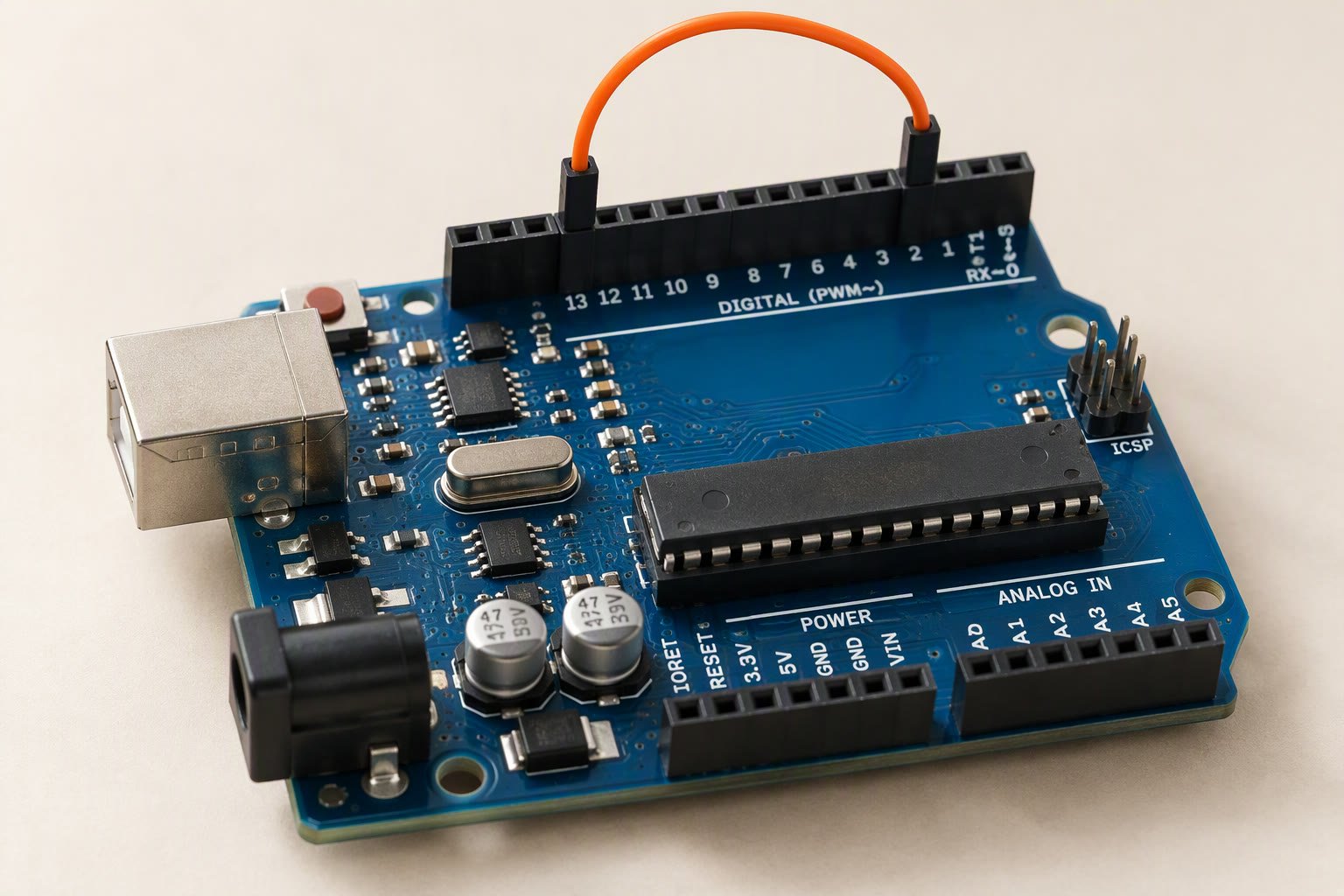
You do not need to memorise 28 pins to build a robot with an Arduino Uno. You need to know which pins can do which job, which two will reset your board if you get them wrong, and how much current the chip will actually give you before it stops being reliable.
The Uno is still the board most Indian colleges teach with, and most clone boards behave the same way as the official one at the pin level. This guide maps the pinout to the jobs a student robot actually needs: motors, sensors, a servo, an IMU and a serial link. Every wiring choice below is about avoiding the three failures that end most first builds — brownouts, burnt pins and a board that resets when the motors start.
The pin groups at a glance
| Group | Pins | What it is good for | What to avoid |
|---|---|---|---|
| Digital | 0–13 | Switches, IR sensors, relays, motor driver inputs | 0 and 1 are the USB serial pins |
| PWM | 3, 5, 6, 9, 10, 11 | Motor speed, LED brightness, servo pulses (library) | Only these six do analogWrite() |
| Analog input | A0–A5 | Potentiometers, analog IR arrays, battery sensing | Maximum 5 V; never a 12 V battery directly |
| I2C | A4 (SDA), A5 (SCL) | MPU6050, OLED displays, I2C sensors | Using them as analog pins when a bus is needed |
| SPI | 10 (SS), 11 (MOSI), 12 (MISO), 13 (SCK) | SD cards, some radio and display modules | Pin 13 also drives the on-board LED |
| External interrupt | 2, 3 | Rotary encoders, limit switches that must not be missed | Expecting every pin to wake the board |
| Power | VIN, 5V, 3V3, GND, AREF | Powering the board and low-current sensors | Motors and servos from the 5V pin |
Digital pins 0–13: inputs, outputs and two you should leave alone
All fourteen digital pins can be inputs or outputs at 5 V logic. Pins 0 and 1 are the hardware serial port used by the USB bridge, so a sensor wired there will fight every Serial.print() and every upload. On a robot, keep 0 and 1 free and use them only when you deliberately need a second serial port.
Pin 13 has a resistor and LED soldered to it on the board. It still works as an input or output, but it sources a little current into that LED, and on some clones the LED loads the line enough to upset a sensor. Use it for a status LED, not for a signal that matters.
Six pins support PWM: 3, 5, 6, 9, 10 and 11. Pins 5 and 6 run at roughly 980 Hz, the rest at roughly 490 Hz. That is fine for motor drivers and LEDs. It is not fine for anything that needs a clean analog voltage, which is why a robot that needs a true analog output uses an external DAC or a filtered PWM pin rather than trusting the raw signal.
External interrupts on pins 2 and 3
Only pins 2 and 3 can trigger a hardware interrupt on the Uno’s ATmega328P. That matters for a rotary encoder on a drivetrain, a limit switch that must stop a motor immediately, or a sensor pulse too short to poll. The rule inside an interrupt service routine is short and boring: set a flag, count a pulse, and leave. No Serial.print(), no delay(), and no floating-point maths. The encoder and interrupt guide walks through the counting code.
Analog pins A0–A5 and the I2C trap
The six analog inputs read 0–5 V and convert to a number from 0 to 1023 — ten bits, about 4.9 mV per step. They are inputs only; you cannot drive a motor driver input from A0. Two of them, A4 and A5, are also the I2C bus (SDA and SCL), which is how an MPU6050, a small OLED or a port expander connects using just two wires plus power.
The trap is planning. A robot that uses an I2C IMU and an I2C display has already spent A4 and A5. If the same build also needs six analog reflectance sensors, the Uno does not have enough analog pins, and the answer is an external ADC or a different board — not squeezing two jobs onto one pin.
Power pins: VIN, 5V, 3V3 and the fuse
VIN accepts 7–12 V and feeds the on-board regulator. 5V is the regulated rail: it powers the chip and can power small sensors. 3V3 is a 3.3 V output from a small second regulator with very little current available, typically tens of milliamps. GND is the common reference — every motor driver, sensor and servo must share it.
Two limits decide most wiring mistakes. First, the USB port has a resettable fuse around 500 mA, so anything that pulls more than that through the board will brown out or drop the USB link. Second, the 5V pin is not a power supply for loads. A single SG90 servo can pull 200 mA while moving and far more when stalled; an MG996R can pull over 1 A. Power servos and motors from a separate battery or buck converter, and connect only the grounds together. The power guide covers the star-ground layout that stops the resets.
Never feed 5 V into the 5V pin while the board is also powered by USB from a laptop. You are connecting two supplies together. Pick one source, or use VIN with the USB removed.
A working pin map for a two-motor robot
| Job | Uno pin | Why this pin |
|---|---|---|
| Left motor direction | D4, D5 | Plain digital outputs to the driver inputs |
| Left motor speed | D6 | PWM |
| Right motor direction | D7, D8 | Plain digital outputs |
| Right motor speed | D9 | PWM |
| HC-SR04 trigger / echo | D11 / D12 | Any digital pins; echo is a pulse to time |
| Left / right IR sensor | A0 / A1 | Analog or digital threshold, your choice |
| Servo signal | D10 | Servo library works on any pin, but keep it off the motor PWM pins |
| MPU6050 | A4, A5 | I2C |
| Bluetooth module | D2, D3 | Software serial; D0/D1 stay free for USB |
| Status LED | D13 | On-board LED, nothing critical |
Current limits you should not cross
The ATmega328P datasheet gives an absolute maximum of 40 mA per pin and 200 mA total across the chip’s supply pins. Absolute maximum is the point where damage begins, not a design target. Treat 20 mA per pin as the working limit, and use a transistor, MOSFET or driver board for anything that draws more: motors, relays, solenoids, high-power LEDs and strips.
There is also a memory limit that surprises beginners: 2 KB of SRAM. A few String objects and a 128×64 display buffer can fill it, and the board resets or behaves randomly with no useful error. Use fixed-size char arrays for messages and keep buffers small. If your robot code keeps freezing after you add a feature, suspect RAM before you suspect the sensor.
The five wiring mistakes that cost the most time
- Motors on the 5V pin. The regulator and USB fuse cannot supply stall current. The board resets the moment the wheels meet carpet.
- No common ground. The driver and the Arduino must share GND, or the logic levels float and the motors twitch.
- Using D0 and D1 for a sensor. Uploads fail and serial output turns to garbage.
- Assuming every pin is PWM.
analogWrite()on D4 or D7 compiles and does nothing useful. - Powering a 3.3 V sensor from 5 V. Some modules tolerate it, some die immediately. Read the module’s regulator and level-shifter situation before connecting.
When the Uno runs out of pins
Four motors, an IMU, two encoders and a display will exhaust an Uno quickly. The usual next step is an ESP32, which has more GPIO, hardware PWM on almost every pin and Wi-Fi built in, at a similar price. The board comparison covers the trade-offs, and the ESP32 DevKit guide maps its pins. If you need to stay on the Uno, a port expander on I2C buys you more digital pins for sensors that do not need speed.
One last habit: draw the pin map on paper before you wire, and label the cable ends. Most “code not working” posts in student groups are a wire in the wrong header row, and a labelled map turns a two-hour debug into a two-minute check.
The Arduino Nano uses the same ATmega328P and pin numbering, with two extra analog-only pins.
Choosing a board as well as a pinout? Arduino vs ESP32 for robotics compares them project by project.
Sources and further reading
- Arduino Uno Rev3 documentation for the official pinout, current notes and board dimensions.
- Arduino language reference: analogWrite() for which pins support PWM and the default frequencies.
- Arduino language reference: attachInterrupt() for the interrupt pins on each board.
- Microchip ATmega328P product page for the absolute maximum current ratings quoted above.
Last reviewed: October 2026. Pin functions and current limits are checked against the Arduino Uno Rev3 documentation and the ATmega328P datasheet. Clone boards may use a different USB-serial chip and regulator; verify the silkscreen before assuming identical behaviour. Not bench-tested by this site.

