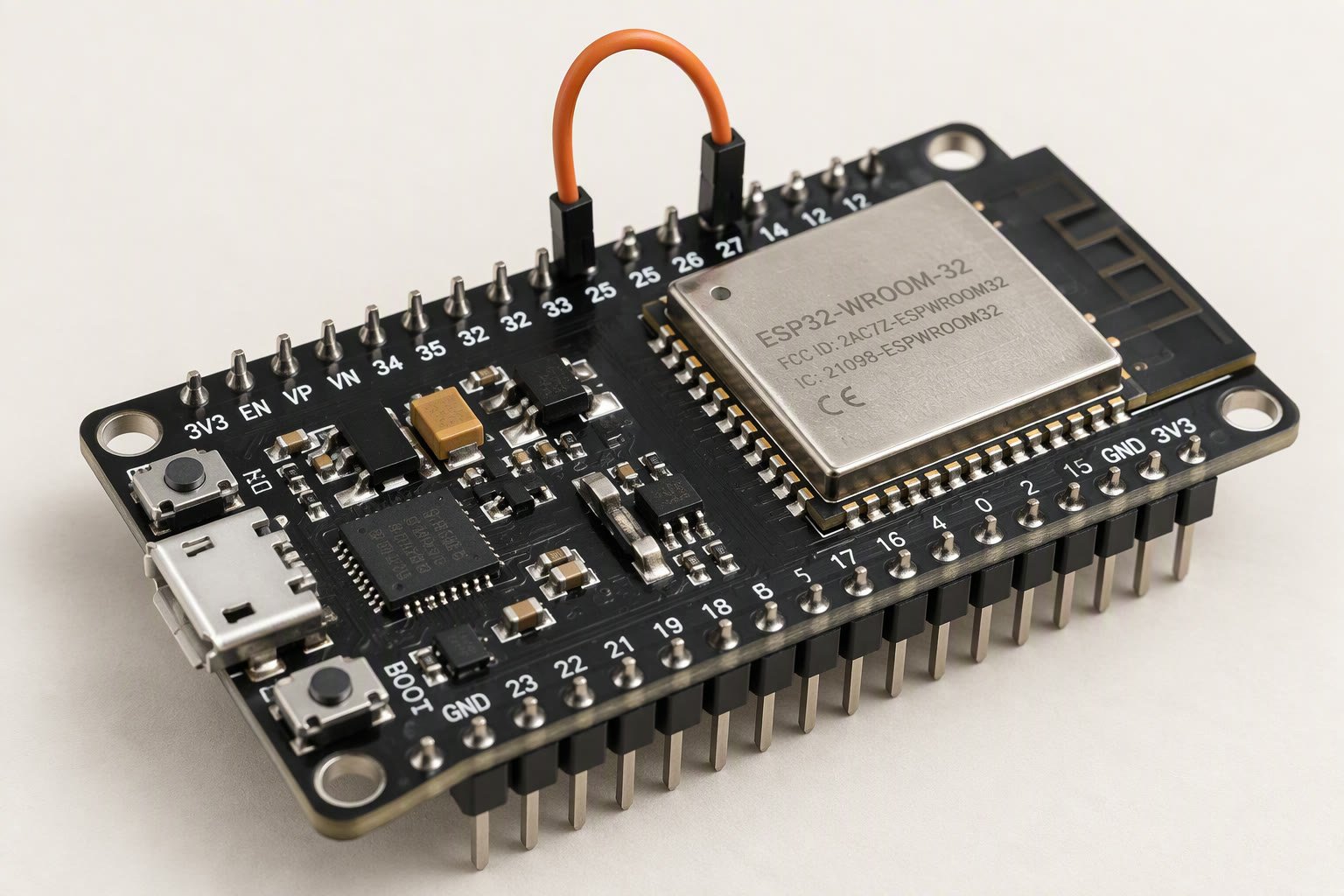
The ESP32 is the board that replaces an Arduino and a Wi-Fi module for about the same money, but its pinout is not a bigger Uno. It runs at 3.3 V, several pins are reserved for flash, four pins decide whether the board boots, and one whole ADC block stops working the moment Wi-Fi turns on.
Those four facts cause almost every ESP32 failure in student robots: a motor driver wired to a strapping pin, an analog sensor that reads fine until the Wi-Fi connects, a 5 V sensor fed into a 3.3 V input, or a pin that simply cannot output because it belongs to the flash chip. This guide maps the DevKit V1 30-pin board, the cheapest and most common ESP32 in India, and shows which pins to spend on a robot.
What the board actually gives you
A DevKit V1 carries an ESP32-WROOM-32 module, a USB-to-serial chip, a 3.3 V regulator, a boot button and an enable button. The module has 32-bit dual-core processing at up to 240 MHz, 520 KB of SRAM, Wi-Fi and Bluetooth, and far more peripherals than an ATmega328P. The trade-off is that not every GPIO is available, and the ones that are have rules.
| Pin group | GPIO | Use it for | Rule |
|---|---|---|---|
| Flash pins | 6–11 | Nothing, ever | Connected to the SPI flash inside the module |
| Input only | 34, 35, 36, 39 | Analog sensors, switches with external pull-ups | No output, no internal pull-up |
| Strapping | 0, 2, 5, 12, 15 | Careful outputs, boot button on 0 | State at power-up changes boot mode |
| ADC1 | 32, 33, 34, 35, 36, 39 | Analog sensors that must work with Wi-Fi on | Usable alongside Wi-Fi |
| ADC2 | 0, 2, 4, 12–15, 25–27 | Analog only when Wi-Fi is off | Unavailable while Wi-Fi is active |
| I2C defaults | 21 SDA, 22 SCL | MPU6050, OLED, port expanders | Any pin can be reassigned in code |
| SPI defaults | 18 SCK, 19 MISO, 23 MOSI, 5 SS | SD cards, displays, radios | GPIO 5 is also a strapping pin |
| UART0 | 1 TX, 3 RX | USB serial and flashing | Leave free unless you know why |
| DAC | 25, 26 | True analog output | Only these two |
| Safe general output | 4, 13, 14, 16, 17, 18, 19, 21, 22, 23, 25, 26, 27, 32, 33 | Motor driver inputs, servos, LEDs, relays | Still check the strapping list |
3.3 V logic is not a suggestion
Every GPIO on the ESP32 is a 3.3 V pin and is not 5 V tolerant. Feeding a 5 V signal into one can damage it immediately or degrade it over weeks. That matters for three common robot parts: an HC-SR04 ultrasonic sensor, many IR modules and some motor drivers.
The HC-SR04 is usually powered from 5 V and drives its echo pin at 5 V. The standard fix is a two-resistor divider on the echo line — 1 kΩ in series and 2 kΩ to ground brings 5 V down to about 3.3 V. A logic level converter module does the same job for several lines. The ESP32 DevKit component guide lists the parts that work directly.
Motor drivers are easier. An L298N accepts 3.3 V logic on its inputs, and a TB6612FNG is happy with 3.3 V too. Servos are the opposite problem: an SG90 expects a 5 V supply and a 3.3 V signal usually works, but the servo must not be powered from the board’s 3.3 V rail.
The ADC2 trap
The ESP32 has two analog-to-digital converters. ADC1 sits on GPIO 32, 33, 34, 35, 36 and 39 and keeps working with Wi-Fi enabled. ADC2 covers most of the remaining pins and is unavailable whenever the Wi-Fi radio is on, because the radio and ADC2 share hardware. Code that reads an ADC2 pin may return zeros or garbage once the board connects.
For a Wi-Fi robot — the reason most people buy an ESP32 — put every analog sensor on ADC1. That includes battery voltage dividers, line sensors read as analog values and potentiometers used for tuning. If you need more analog channels than ADC1 offers, add an external ADC over I2C rather than moving sensors to ADC2 and hoping.
Power: VIN, 3V3 and why motors never touch either
VIN accepts about 5 V from USB or an external supply and feeds the 3.3 V regulator. The 3V3 pin is the regulator output and can supply small sensors, but the regulator is a linear part with limited current and little heatsinking. Wi-Fi transmit bursts draw several hundred milliamps, and the board alone can brown out on a weak USB port or a thin cable.
Motors and servos go on their own battery and their own driver. Share ground, keep the motor current loop away from the logic wiring, and add a bulk capacitor near the driver. A robot that reboots when the motors start is almost always a power and ground problem, not a software one. The power guide covers the wiring order, and the buck converter guide covers dropping a 12 V pack to a stable 5 V for servos.
Strapping pins: the four that decide whether it boots
GPIO 0, 2, 5, 12 and 15 are sampled at reset. Pull one to the wrong level at power-up and the board enters download mode or refuses to start. The usual symptom is a board that works on USB but not on battery, because a sensor or driver module holds a strapping pin low.
GPIO 0 is the boot button and is pulled high on the board. GPIO 2 must be low or floating at boot; it is also connected to the on-board LED on many DevKits. GPIO 12 (MTDI) affects the flash voltage and should not be pulled high at boot. GPIO 15 must be high at boot, so a device that pulls it low will stop the board starting. If a build will not boot on battery, disconnect modules from these pins first.
A pin map for a Wi-Fi robot car
| Job | GPIO | Note |
|---|---|---|
| Left motor IN1 / IN2 | 25 / 26 | Safe outputs, also the DAC pins if you later need analog |
| Left motor PWM | 27 | Any output pin works with LEDC |
| Right motor IN1 / IN2 | 32 / 33 | Safe outputs |
| Right motor PWM | 14 | Safe output, check it is not held at boot by your module |
| HC-SR04 trigger | 13 | 3.3 V trigger is accepted by most modules |
| HC-SR04 echo | 34 | Input only — correct for an echo signal through a divider |
| Battery voltage sense | 35 | ADC1, input only, divider required |
| MPU6050 | 21, 22 | I2C |
| Status LED | 2 | On-board LED on many boards; avoid for anything critical |
PWM, servos and the LEDC peripheral
The ESP32 does not use the Arduino Uno’s fixed PWM pins. Its LEDC peripheral provides 16 channels that can be routed to almost any output pin, with configurable frequency and resolution. Motor control gets a few kilohertz, and an LED gets whatever looks smooth. The Arduino-ESP32 core exposes this through ledcSetup(), ledcAttachPin() and ledcWrite(), or through the newer analogWrite() support depending on core version.
Servos need a 50 Hz signal with a 1–2 ms pulse. The ESP32 Servo library handles that on any output pin, but it consumes LEDC channels, so a robot with four servos and four PWM motor channels is close to the limit. Plan the channel budget the same way you plan pins.
// Two DC motors on an L298N, ESP32 DevKit V1
const int IN1 = 25, IN2 = 26, ENA = 27;
const int IN3 = 32, IN4 = 33, ENB = 14;

void setup() {
  pinMode(IN1, OUTPUT); pinMode(IN2, OUTPUT);
  pinMode(IN3, OUTPUT); pinMode(IN4, OUTPUT);
  ledcAttach(ENA, 20000, 8);   // 20 kHz, 8-bit, Arduino-ESP32 core 3.x
  ledcAttach(ENB, 20000, 8);
}

void loop() {
  digitalWrite(IN1, HIGH); digitalWrite(IN2, LOW);
  digitalWrite(IN3, HIGH); digitalWrite(IN4, LOW);
  ledcWrite(ENA, 180);         // about 70 percent
  ledcWrite(ENB, 180);
  delay(2000);
  ledcWrite(ENA, 0); ledcWrite(ENB, 0);
  delay(2000);
}
On core 2.x the PWM calls are ledcSetup(channel, freq, resolution) and ledcAttachPin(pin, channel). Check your installed core version before copying code from a tutorial, because the API changed and the old calls no longer compile on 3.x.
ESP32 or Arduino for your next robot?
Choose the ESP32 when you need Wi-Fi, Bluetooth, camera work, more pins, more memory or faster processing, and when your sensors can live on 3.3 V. Choose an Uno or Nano when the guide you are following is written for 5 V parts and you want the simplest possible wiring. The board comparison covers the Linux side, and the Pico W guide covers the third option at a similar price.
If the project includes a camera, read the ESP32-CAM guide first: the camera and SD card leave only one reliable GPIO free.
The Arduino vs ESP32 comparison covers the 3.3 V and ADC2 pitfalls before you wire a sensor.
Before wiring sensors, read the micro-ROS guide for the node side, and the MQTT telemetry guide for dashboards.
Once the wiring is done, an Android app is the quickest controller.
Pin choice comes first, then timing: the FreeRTOS task structure keeps the control loop on schedule.
Pin choice decides whether the board boots, so pair the pinout with the ESP32 robot wiring guide.
Sources and further reading
- Espressif ESP32 datasheet for pin functions, strapping pins and current figures.
- ESP-IDF ADC documentation for the ADC1 and ADC2 channel map and the Wi-Fi limitation.
- Arduino-ESP32 LEDC documentation for PWM channels and the current API.
- ESP-IDF sleep modes for deep-sleep current on the chip itself.
Last reviewed: October 2026. Pin roles are checked against the ESP32 datasheet and Espressif documentation. DevKit boards differ in silkscreen labels and in which GPIOs are broken out; confirm against your board’s pin diagram. Not bench-tested by this site.

