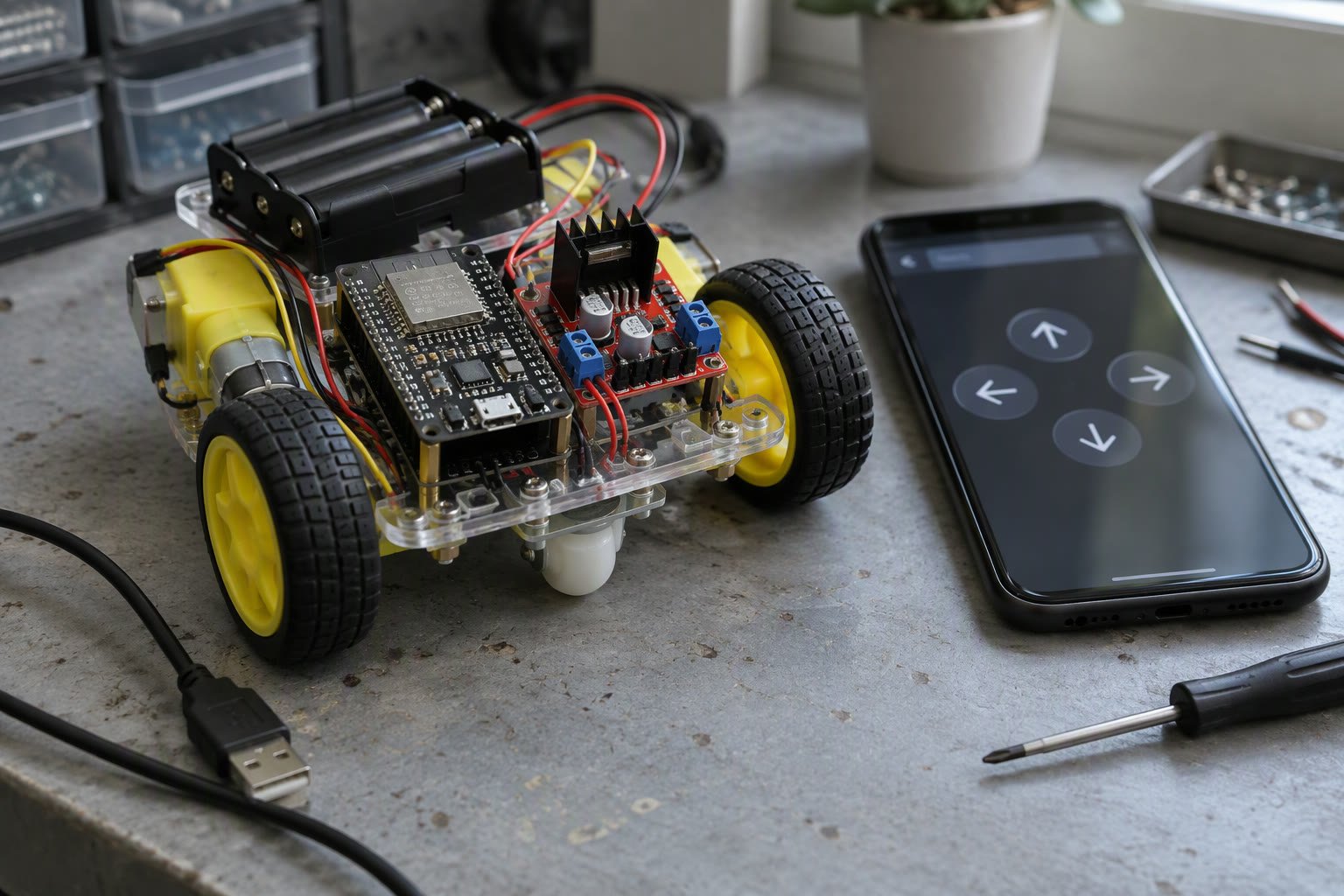
Wi-Fi control is not just Bluetooth with a longer cable. Once the robot is on a network, latency, power and security all become design decisions instead of afterthoughts.
This guide builds a browser-controlled ESP32 robot properly: a web server on the board, a motor driver that survives stall current, a dead-man timeout so the robot stops when the phone drops, and enough discussion of access points and passwords to keep the thing off the open internet.
Choose the radio before the robot
An ESP32 has Wi-Fi and Bluetooth built in. Bluetooth Low Energy is simple and low power, but the range is short and Android and iOS handle it differently. Classic Bluetooth serial works with a cheap HC-05 module and is the easiest path to a phone app. Wi-Fi gives range through a house and lets you use a plain browser, which means no app store, no permissions and no pairing.
| Option | Range indoors | Setup effort | Best for |
|---|---|---|---|
| HC-05 classic Bluetooth | 5 to 10 m | Low, pairs like a headset | Quick demo, phone terminal app |
| ESP32 BLE | 5 to 15 m | Medium, needs an app or web BLE | Low-power handheld controller |
| ESP32 Wi-Fi access point | 10 to 30 m | Low, connect to its own network | Field demo with no router |
| ESP32 Wi-Fi on a home router | Coverage of the router | Medium, credentials and IP address | Camera streaming, telemetry logging |
For a first Wi-Fi build, run the ESP32 as its own access point. The robot broadcasts a network, you connect to it, and you open a fixed address. Nothing depends on a router being present, and nothing is exposed to the internet.
Wiring and power
The logic is straightforward: four GPIO pins drive a dual motor driver, and the ESP32 serves a page with buttons that call those pins. The part that catches people is current.
- Separate supplies. Motors from a battery pack, ESP32 from a 5 V regulator or a USB power bank. Tie the grounds together or the driver inputs float.
- Common ground is mandatory. A missing ground makes the driver behave randomly and is the most common wiring fault.
- Decoupling. Put a 470 to 1000 microfarad electrolytic capacitor across the motor supply to absorb start-up surges.
- Pin choice. Avoid the ESP32 boot-strapping pins (GPIO 0, 2, 12, 15) for motor outputs, because a pulled pin can stop the board booting. The ESP32 pinout guide lists the safe pins.
- Motor driver. An L298N works but wastes voltage; a TB6612FNG or DRV8833 is better for small robots. The L298N versus TB6612FNG comparison explains the trade.

A web server that actually drives the motors
This sketch starts an access point, serves one page, and maps four URLs to motor commands. It also stops the robot if no command arrives for 500 milliseconds, which is the difference between a dropped connection and a runaway robot.
#include <WiFi.h>
#include <WebServer.h>

const char* ssid = "robot-demo";
const char* pass = "changeme123";

WebServer server(80);
const int A1 = 25, A2 = 26, B1 = 27, B2 = 14;
unsigned long lastCmd = 0;

void stopMotors() {
  digitalWrite(A1, LOW); digitalWrite(A2, LOW);
  digitalWrite(B1, LOW); digitalWrite(B2, LOW);
}

void forward()  { digitalWrite(A1, HIGH); digitalWrite(A2, LOW);
                  digitalWrite(B1, HIGH); digitalWrite(B2, LOW); }
void backward() { digitalWrite(A1, LOW);  digitalWrite(A2, HIGH);
                  digitalWrite(B1, LOW);  digitalWrite(B2, HIGH); }
void left()     { digitalWrite(A1, LOW);  digitalWrite(A2, HIGH);
                  digitalWrite(B1, HIGH); digitalWrite(B2, LOW); }
void right()    { digitalWrite(A1, HIGH); digitalWrite(A2, LOW);
                  digitalWrite(B1, LOW);  digitalWrite(B2, HIGH); }

void handle(const char* name, void (*action)()) {
  server.on(String("/") + name, [action]() {
    action();
    lastCmd = millis();
    server.send(200, "text/plain", "ok");
  });
}

void setup() {
  pinMode(A1, OUTPUT); pinMode(A2, OUTPUT);
  pinMode(B1, OUTPUT); pinMode(B2, OUTPUT);
  stopMotors();

  WiFi.softAP(ssid, pass);                 // robot's own network
  server.on("/", []() {
    server.send(200, "text/html",
      "<meta name=viewport content='width=device-width,initial-scale=1'>"
      "<button ontouchstart=\"fetch('/f')\">Forward</button>"
      "<button ontouchstart=\"fetch('/b')\">Back</button>"
      "<button ontouchstart=\"fetch('/l')\">Left</button>"
      "<button ontouchstart=\"fetch('/r')\">Right</button>"
      "<button onclick=\"fetch('/s')\">Stop</button>");
  });
  handle("f", forward); handle("b", backward);
  handle("l", left);    handle("r", right);
  handle("s", stopMotors);
  server.begin();
}

void loop() {
  server.handleClient();
  if (millis() - lastCmd > 500) stopMotors();   // dead-man timeout
}
Two design choices in that sketch are worth defending. The timeout means a lost packet or a closed browser tab stops the robot rather than leaving it driving. The access point mode means the board is not reachable from the office network at all, which removes a whole class of problems before they start.
Latency and the feel of control
A browser request per button press adds round-trip time, and on a congested 2.4 GHz band that can reach several hundred milliseconds. The robot feels laggy and you overcorrect. There are three practical fixes.
- Press and hold, not tap. Send a command on touch start and a stop on touch end. The robot moves for as long as you hold.
- Use a WebSocket. One persistent connection carries small messages with far less overhead than a new HTTP request each time. The ESP32 WebSocket library keeps the code short.
- Send target speeds, not keys. Sending a signed speed value lets the board ramp the motors smoothly instead of slamming between full forward and stop.
If the page itself loads slowly, the board is usually blocked serving files or printing to serial. Keep the page small and avoid delay() anywhere in the loop.
Security without overengineering
An ESP32 web server has no login by default. Anyone on the network can drive the robot, and if you forward a port to the internet, anyone at all can. For a school project on its own access point with a unique password, that is acceptable. For anything else, apply the basics.
- Never port-forward the board to the internet. If you need remote access, put it behind a VPN.
- Change the default SSID and password, and do not reuse a password you care about.
- Add a simple shared token in the URL or header if more than one person uses the network.
- Keep the robot’s own network isolated from your home or office network where the router allows a guest network.
Adding a camera and telemetry
The moment the robot has Wi-Fi, adding video is tempting. An ESP32-CAM streams low-resolution video without much effort, and the ESP32-CAM streaming guide covers the wiring and frame rate you can realistically expect. Do not expect smooth 720p; a small JPEG stream at a few frames per second is the honest result, and it is enough for driving by sight at walking pace.
For data rather than video, MQTT is a better fit than HTTP polling. The MQTT telemetry guide shows how to publish battery voltage and speed to a broker, which is the foundation of any dashboard or remote monitoring.
If you would rather build a native Android app than a web page, the Android app control guide is the direct route. And if you are still deciding between boards, Arduino versus ESP32 covers when the extra radio and speed are worth the extra care.
A test sequence
- Power the board alone and confirm the access point appears within a few seconds.
- Open the page and confirm buttons respond while the wheels are off the floor.
- Check that closing the browser stops the motors within half a second.
- Walk to the far end of the range and confirm behaviour, then note where it drops.
- Run for fifteen minutes and feel the driver and battery for heat.
- Disconnect the router or move out of range while driving and confirm the robot stops.
That last test is the one people skip. A robot that keeps driving when the link dies is not a robot you can safely demonstrate anywhere.
Why does my ESP32 robot disconnect when the motors start?
The motor surge pulls the supply down and browns out the board. Use a separate motor battery, add a large capacitor across the motor supply, and keep the grounds tied together.
Can I control the robot from outside my house?
Not safely by port forwarding. Use a VPN, or publish commands through an MQTT broker with authentication instead of exposing the board directly.
How much delay should I expect from a browser button?
Typically 50 to 300 milliseconds on a quiet 2.4 GHz network, worse with congestion. Press-and-hold control and a WebSocket connection both reduce the perceived lag.
Which ESP32 pins should I avoid for motors?
Avoid the boot-strapping pins GPIO 0, 2, 12 and 15, and the input-only pins 34 to 39. Choose ordinary output-capable pins and check the pinout for your board variant.
Do I need a motor driver with an ESP32?
Yes. The ESP32 pins supply milliamps at 3.3 volts; a motor needs amps. A driver such as the TB6612FNG or DRV8833 handles the current and the reverse polarity.
Sources and further reading
- ESP32 Arduino Wi-Fi library — station and soft access point modes.
- ESP32 WebServer library — routing and request handling.
- Espressif ESP32 product page — radio and peripheral specifications.
- Random Nerd Tutorials ESP32 web server — worked example and pin notes.

