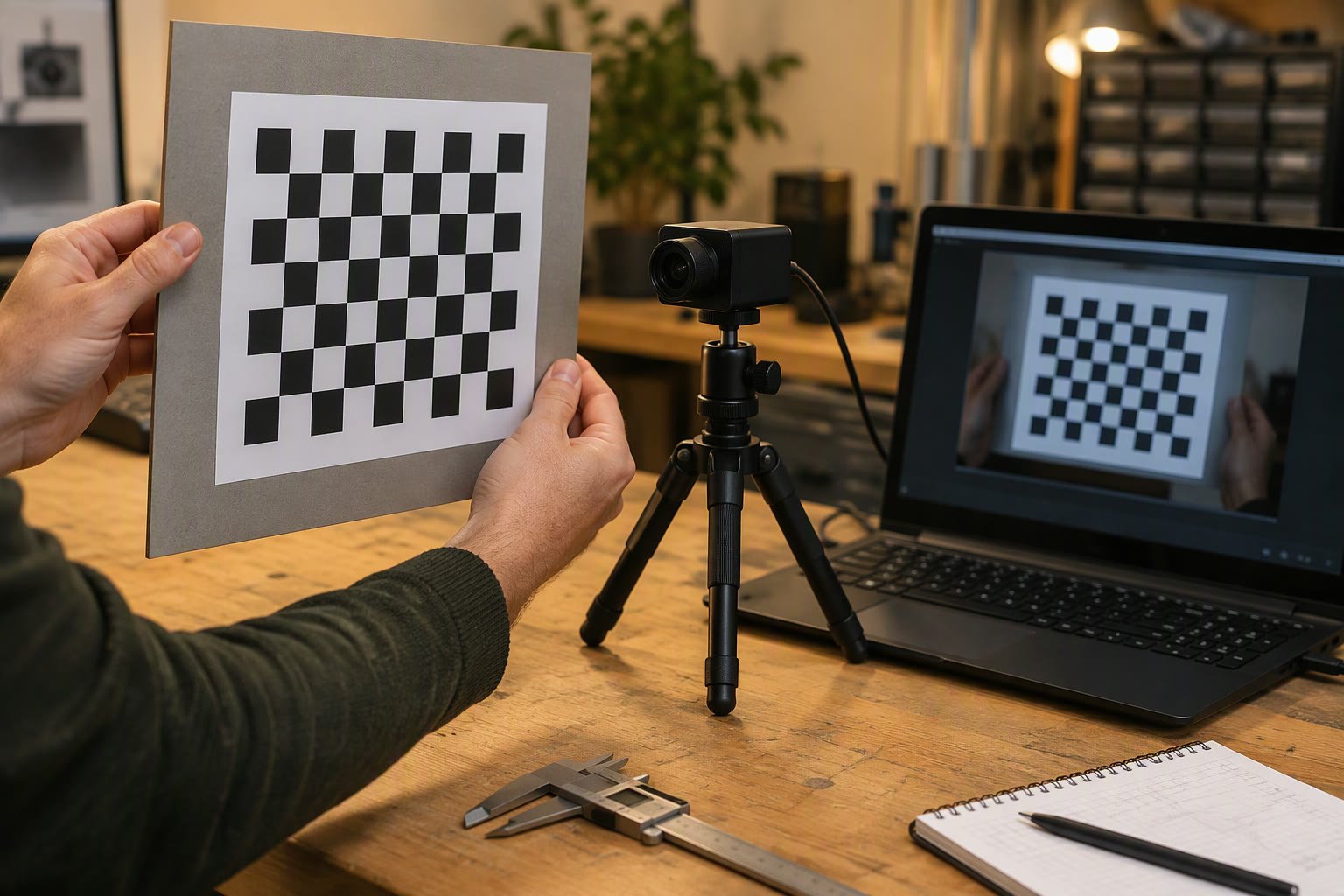
A camera that has never been calibrated gives you pixels, not millimetres. Calibration finds the lens and sensor parameters that turn an image back into geometry.
This tutorial covers what the numbers mean, how to capture a usable calibration set, the OpenCV calls that compute them, how to check whether the result is good, and where calibration fits in a robot that has to pick something up.
What calibration actually computes
A camera model maps a point in the world to a pixel. Calibration estimates the parameters of that mapping so the reverse becomes possible.
| Parameter | Meaning | Typical effect if wrong |
|---|---|---|
| fx, fy | Focal length in pixels | Scale of distance estimates is wrong |
| cx, cy | Principal point, usually near the image centre | Offsets grow towards the edges |
| k1, k2, k3 | Radial distortion | Straight lines bow, especially at the edges |
| p1, p2 | Tangential distortion | Lens not parallel to the sensor |
Those are called the intrinsic parameters. Extrinsic parameters describe where the camera sits relative to the world, and they are solved separately, usually with solvePnP once the intrinsics are known.
The calibration target
A printed chessboard is the standard target because corners are easy to locate to sub-pixel accuracy. Wording matters: a “9 by 6” board usually means 9 by 6 inner corners, which is a board with 10 by 7 squares. Count the inner corners, not the squares.
- Print on matte paper and glue it to a rigid flat board; a curling sheet ruins the data.
- Measure the square size with calipers and use that number, not the nominal print size.
- Aim for a board that fills roughly half the image at the working distance.
- Avoid glare and shadows across the corners.
- For a small robot camera, an A4 board is usually enough.
Capturing a good set of images
Fifteen to twenty-five images are normally enough if they cover the image area and the range of angles. More images from the same position add almost nothing; varied images add a lot.
- Tilt the board up to about 45 degrees in different directions, including both axes.
- Move the board to all four corners of the frame, not only the centre.
- Include close and far positions to cover depth.
- Keep the whole board visible in every image.
- Hold still: motion blur destroys corner accuracy.
- Use the same resolution you will use at run time; changing resolution invalidates the result.
The OpenCV pipeline
The sequence is: find corners, refine them to sub-pixel accuracy, add 3D object points, call calibrateCamera, then keep the matrix and distortion coefficients.
import cv2, numpy as np, glob

COLS, ROWS = 9, 6          # inner corners
SQUARE_MM = 25.0

objp = np.zeros((ROWS * COLS, 3), np.float32)
objp[:, :2] = np.mgrid[0:COLS, 0:ROWS].T.reshape(-1, 2) * SQUARE_MM

objpoints, imgpoints = [], []
gray_shape = None

for path in glob.glob("calib/*.jpg"):
    img = cv2.imread(path)
    gray = cv2.cvtColor(img, cv2.COLOR_BGR2GRAY)
    gray_shape = gray.shape[::-1]
    found, corners = cv2.findChessboardCorners(
        gray, (COLS, ROWS),
        cv2.CALIB_CB_ADAPTIVE_THRESH + cv2.CALIB_CB_NORMALIZE_IMAGE)
    if not found:
        print("no corners:", path)
        continue
    corners = cv2.cornerSubPix(
        gray, corners, (11, 11), (-1, -1),
        (cv2.TERM_CRITERIA_EPS + cv2.TERM_CRITERIA_MAX_ITER, 30, 0.001))
    objpoints.append(objp)
    imgpoints.append(corners)

rms, K, dist, rvecs, tvecs = cv2.calibrateCamera(
    objpoints, imgpoints, gray_shape, None, None)

print("RMS reprojection error:", round(rms, 4))
print("camera matrix:\n", K)
print("distortion:", dist.ravel())
The RMS value is the average distance, in pixels, between where a corner was detected and where the model projects it. It is the single best quick check on the calibration.
Reading the result
| RMS error | Interpretation |
|---|---|
| Below 0.3 px | Excellent; usually a good target and sharp images |
| 0.3–0.5 px | Good for most robot vision work |
| 0.5–1.0 px | Usable, but check for blurred or badly lit images |
| Above 1.0 px | Recapture; something is wrong with the set |
Also sanity-check the numbers. fx and fy should be close to each other on a normal camera. cx and cy should be near the image centre, within a few percent. A wildly asymmetric fx and fy usually means a bad capture set rather than a strange lens.
You can estimate the expected focal length before calibrating: f in pixels is approximately the sensor width in pixels times the focal length in millimetres divided by the sensor width in millimetres. If calibration lands far from that estimate, look for a mistake in the square size.
Undistorting an image
For measurement, undistort the image before detecting anything. The function getOptimalNewCameraMatrix chooses a new matrix that keeps as much of the useful image as possible.
h, w = img.shape[:2]
newK, roi = cv2.getOptimalNewCameraMatrix(K, dist, (w, h), 1, (w, h))
undistorted = cv2.undistort(img, K, dist, None, newK)
Undistortion costs time. At 30 frames per second on a small board, it may be cheaper to keep the raw image and pass the distortion coefficients into solvePnP, which handles them internally. Choose one path and stay consistent.
From pixels to a 3D position
With intrinsics known, solvePnP finds the pose of a known object in the camera frame. That needs the object’s 3D points, its matching image points, and the camera matrix.
ok, rvec, tvec = cv2.solvePnP(
    object_points, image_points, K, dist,
    flags=cv2.SOLVEPNP_IPPE_SQUARE)

R, _ = cv2.Rodrigues(rvec)
camera_position_of_object = tvec.ravel()   # millimetres if points are mm
Two warnings. First, a single view gives you pose but not scale unless the object’s real size is in the 3D points. Second, depth error grows with distance squared for a small object; a marker that is 40 pixels wide gives a much worse distance estimate than one that is 200 pixels wide.
Hand-eye calibration for an arm-mounted camera
If the camera is mounted on the robot arm, you need the transform between the camera and the tool or the arm base. That is hand-eye calibration, and OpenCV provides calibrateHandEye.
- Eye-in-hand: camera on the arm, target fixed in the workspace.
- Eye-to-hand: camera fixed, target on the arm.
- Capture at least 10 to 15 poses with varied rotation, not just translation.
- Record the robot pose and the target pose for each capture.
- Check the residual; a good hand-eye result is consistent across poses.
Hand-eye errors are multiplicative with everything else. Calibrate the camera first, then the hand-eye, and verify by touching a known point and comparing the commanded position with the measured one.
Calibration mistakes worth avoiding
| Mistake | Result |
|---|---|
| Printing a board and assuming the square size | Scale error across every measurement |
| All images from the same angle | Distortion and focal length poorly constrained |
| Board always in the centre | Edges calibrated badly |
| Blurred images | High RMS, unstable parameters |
| Calibrating at 640×480 and running at 1280×720 | Parameters do not apply |
| Reusing a calibration after a lens change or focus change | Silent accuracy loss |
Refocusing a lens changes the focal length slightly. If your camera has a manual focus ring, lock it with a set screw or tape after calibration, and recalibrate whenever the focus moves.
How often to recalibrate
Recalibrate when the camera is bumped, the lens is changed, the resolution changes, the focus ring moves, or the mount flexes. In a production cell, add a quick verification target in the field of view and check it at the start of every shift.
A simple verification is cheap: place a printed marker at a known position, estimate its pose, and compare. If the error grows beyond your tolerance, recalibrate before the robot starts picking.
What calibration does not fix
Calibration corrects lens geometry, not bad lighting, motion blur or a loose mount. It also cannot recover depth from a single camera without a known object size. And it does not correct a camera that is mounted at an angle you assumed was square to the table.
If your pick error is consistent in one direction, suspect the camera-to-robot transform, not the intrinsics. If the error grows towards the edges, suspect distortion or an incomplete calibration set. If the error is random, suspect lighting, vibration or detection.
Related: robot vision camera guide, OpenCV on Raspberry Pi, ArUco marker localisation, YOLO object detection, machine vision lighting.
How many images do I need to calibrate a camera?
Fifteen to twenty-five varied images are normally enough. Variety matters more than count: different angles, positions and distances. Twenty identical images add nothing.
What RMS reprojection error is acceptable?
Below 0.5 pixels is good for most robot vision work, and below 0.3 is excellent. Above 1.0 suggests blurred images, a bad target or an incorrect square size, so recapture.
Why is my camera calibration wrong at the edges?
Usually because the board never appeared near the edges during capture, so distortion is poorly constrained. Recapture with the board in all four corners at several angles.
Do I need a different calibration for a different resolution?
Yes. The camera matrix is expressed in pixels, so changing resolution or cropping invalidates it. Calibrate at the resolution you will actually use, or scale the matrix and retest.
What is hand-eye calibration?
It finds the transform between a camera and the robot arm, needed when the camera is mounted on the arm or observes the arm. It is done after camera calibration using several robot poses.
A depth camera needs its own calibration pair, which the depth camera guide explains alongside point cloud filtering.
Calibrate on the machine that will run the pipeline; this setup guide covers CUDA OpenCV and GStreamer capture.
Any measurement in millimetres depends on calibration, and this guide shows where it fits in the project.
Calibration assumes the frames arrive intact, so confirm the camera interface and cabling limits before you tune anything.
Calibration corrects residual distortion, but the lens choice decides how much distortion you have to correct.
Sources and further reading
- OpenCV camera calibration — the official tutorial and API reference.
- OpenCV calib3d — solvePnP, Rodrigues and hand-eye functions.
- ROS 2 documentation — camera_info and image pipeline conventions.

