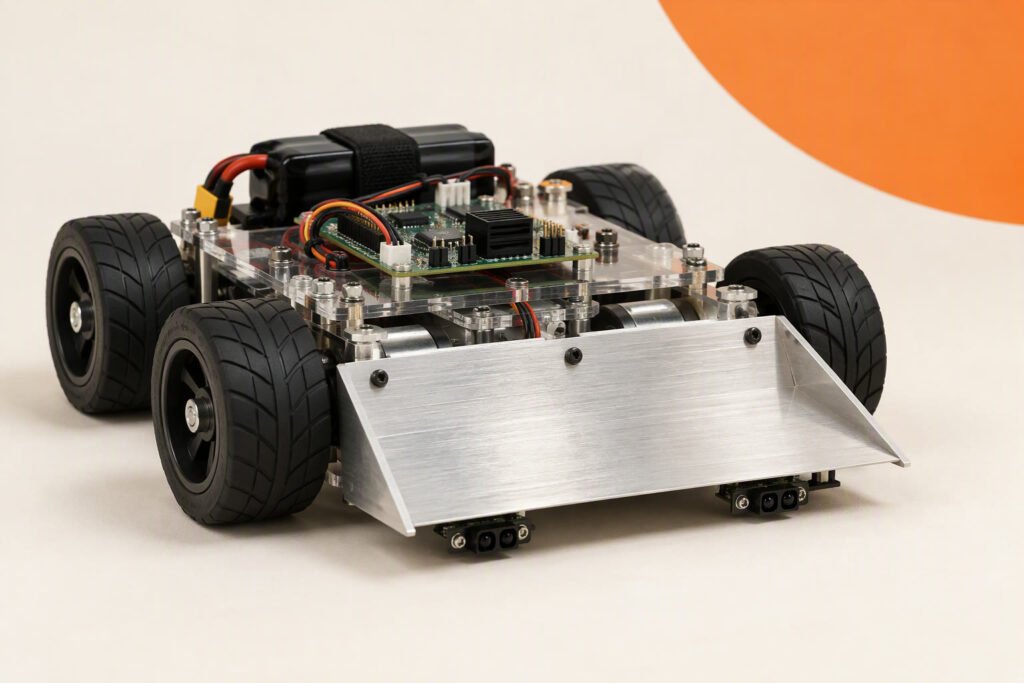
A ₹1,630 robot that tries to push an opponent out of a ring while never leaving it itself. Two reflective sensors watch for the white border, an ultrasonic sensor looks for the opponent, and the sketch always checks the edge first. The page works out how far the robot travels while it is deciding, which is what actually decides whether it falls off.
Scope: intermediate. This is a design worksheet with illustrative costs. It has not been bench-tested by this site. The decision-distance table below was computed by script. Mini-sumo events have published rules for the size, weight and ring, commonly a robot within about 10 cm by 10 cm and 500 g on a ring roughly 77 cm across with a white border, but rules differ between events, so check the current rules of the competition you enter. A chassis built from a generic 2WD kit is likely too large for those limits, and this worksheet is better read as a way to learn the control logic.
How it works
Safety always comes first in the code: every loop reads the two edge sensors before anything else. If either sees the white border, the robot reverses and turns away, and nothing else runs until that is done. Only if both edge sensors are clear does it look for the opponent: if the front ultrasonic sensor reads under about 40 cm it drives forward at full speed, otherwise it spins slowly to search.
The reason edge handling must be fast is distance. During the time the controller needs to notice the border and brake, the robot keeps moving. At 0.5 m/s a 10 ms decision delay is 5 mm and a 50 ms delay is 25 mm; at 1.0 m/s the same delays are 10 mm and 50 mm. If the edge sensor is mounted only 20 mm ahead of the wheels, a slow loop can carry the robot over the edge before the reverse starts.
Bill of materials
| Part | Qty | Unit | Total |
|---|---|---|---|
| Arduino Uno R3 (or compatible) | 1 | ₹550 | ₹550 |
| HC-SR04 ultrasonic sensor | 1 | ₹110 | ₹110 |
| Reflective (line) sensor module | 2 | ₹40 | ₹80 |
| L298N motor driver board | 1 | ₹180 | ₹180 |
| 2WD chassis kit with two gear motors and wheels | 1 | ₹450 | ₹450 |
| Battery holder with two 18650 cells | 1 | ₹210 | ₹210 |
| Jumper wires | 1 | ₹50 | ₹50 |
| Parts total | ₹1,630 | ||
Scroll the table sideways to see every column.
Prices checked Nov 2026. Shipping and tools are not included.
Prices are illustrative figures for Indian sellers in November 2026, before shipping, and have not been checked against current listings.
The numbers
| Robot speed | Distance in 10 ms | Distance in 50 ms |
|---|---|---|
| 0.5 m/s | 5 mm | 25 mm |
| 1.0 m/s | 10 mm | 50 mm |
| 1.5 m/s | 15 mm | 75 mm |
The ultrasonic sensor is the slow part. A ping with a 5 ms timeout and a 20 ms pause means the front sensor refreshes about 40 times a second. Because the edge sensors are read every loop, and the ultrasonic ping is only done every 20 ms, the loop below keeps the edge check first and quick. A faster infrared rangefinder is a common upgrade for serious robots.
Power and wiring
| Part | Connects to | Note |
|---|---|---|
| Left edge sensor | A0 | Analog output of the reflective sensor |
| Right edge sensor | A1 | |
| HC-SR04 TRIG / ECHO | D12 / D13 | Facing forward, low |
| L298N ENA / IN1 / IN2 | D5 / D7 / D8 | Left motor |
| L298N ENB / IN3 / IN4 | D6 / D9 / D4 | Right motor |
| Battery | L298N 12V input and Uno VIN | Check your pack voltage against the board limits |
The sketch
// Mini-sumo: Uno + 2 reflective edge sensors + HC-SR04 + L298N
// Design worksheet: calibrate EDGE_THRESHOLD; check event rules for size and weight.

const int L_EN = 5, L_IN1 = 7, L_IN2 = 8;
const int R_EN = 6, R_IN3 = 9, R_IN4 = 4;
void drive(int left, int right) {   // -255..255 per side
  digitalWrite(L_IN1, left >= 0);  digitalWrite(L_IN2, left < 0);
  digitalWrite(R_IN3, right >= 0); digitalWrite(R_IN4, right < 0);
  analogWrite(L_EN, constrain(abs(left), 0, 255));
  analogWrite(R_EN, constrain(abs(right), 0, 255));
}
void motorsInit() {
  pinMode(L_EN, OUTPUT); pinMode(L_IN1, OUTPUT); pinMode(L_IN2, OUTPUT);
  pinMode(R_EN, OUTPUT); pinMode(R_IN3, OUTPUT); pinMode(R_IN4, OUTPUT);
}

const int EDGE_L = A0, EDGE_R = A1;
const int TRIG = 12, ECHO = 13;
const int EDGE_THRESHOLD = 500;         // between your black and white readings
const bool WHITE_IS_HIGH = true;        // set false if white reads lower
const float ATTACK_CM = 40.0;
const int ATTACK = 255, SEARCH = 110, BACK = 200;

float ping() {
  digitalWrite(TRIG, LOW);  delayMicroseconds(2);
  digitalWrite(TRIG, HIGH); delayMicroseconds(10);
  digitalWrite(TRIG, LOW);
  unsigned long t = pulseIn(ECHO, HIGH, 5000UL);     // about 85 cm
  return t == 0 ? 200 : t / 58.3;
}

bool onWhite(int pin) {
  int v = analogRead(pin);
  return WHITE_IS_HIGH ? (v > EDGE_THRESHOLD) : (v < EDGE_THRESHOLD);
}

unsigned long lastPing = 0;
float dist = 200;

void setup() {
  motorsInit();
  pinMode(TRIG, OUTPUT); pinMode(ECHO, INPUT);
  delay(5000);                           // events usually require a start delay
}

void loop() {
  bool l = onWhite(EDGE_L), r = onWhite(EDGE_R);

  if (l || r) {                          // 1. edge: highest priority
    drive(-BACK, -BACK); delay(150);
    if (l && !r)      drive(BACK, -BACK);     // turn right, away from the left edge
    else if (r && !l) drive(-BACK, BACK);     // turn left, away from the right edge
    else              drive(BACK, -BACK);
    delay(180);
    return;
  }

  if (millis() - lastPing >= 20) { dist = ping(); lastPing = millis(); }

  if (dist < ATTACK_CM) drive(ATTACK, ATTACK);    // 2. attack
  else drive(SEARCH, -SEARCH);                    // 3. search by spinning
}
The reverse and turn use delay() because nothing else should happen then, and the edge check comes back on the next pass. The ultrasonic sensor can be fooled by the ring wall or by spectators, which is another reason rangefinders and careful aiming matter in real competitions. The sketch has been proofread but not compiled on this site.
Test plan
- Edge readings: hold the robot over black and over white and write down both analog readings for each sensor; set the threshold between them.
- Edge test on a table: place the robot on a large board with a white border, put a foam block on the floor under it, and see that it never falls from a modest speed.
- Stopping distance: measure how far it travels past the line before it reverses, at attack speed.
- Opponent detection: check the front sensor sees a can or a box at 30 and 40 cm.
- Spin search: confirm the search spin is slow enough that the sensor can see the target.
- Push test: push a lighter object off the ring and note the traction.
What usually goes wrong
| Symptom | Likely cause | Fix |
|---|---|---|
| Drives off the ring | Edge sensor too close to the wheels or too slow | Move the sensors forward and shorten the loop |
| Turns away from the opponent | Ring wall or spectator seen as a target | Narrow the attack distance, aim the sensor lower |
| Wheels slip when pushing | Poor traction | Clean the tyres or use softer rubber |
| Does not see the border | Threshold wrong | Re-measure black and white values |
| Slow to react | Ultrasonic ping blocks the loop | Keep the short timeout and 20 ms spacing |
Upgrades
- Faster rangefinder: use an infrared distance sensor for the opponent.
- Two front sensors: add left and right angled sensors to steer toward the opponent.
- Smaller chassis: build to the event’s size and weight limits.
- Wedge front: add a low scoop to get under the opponent.
Cost and parts notes
The ₹1,630 total is an illustration and does not include shipping. Use the cost calculator to compare sellers.
Common questions
What are the mini-sumo size limits?
Events commonly publish about 10 cm by 10 cm and 500 g, but check your event’s current rules.
Why check the edge first?
Falling out of the ring loses the match, so the edge reaction must never wait for anything else.
Why does speed matter so much?
The faster the robot, the farther it travels during the decision delay, so it can pass the line before it reverses.
Is an ultrasonic sensor good enough?
It works for learning. Competitive robots usually use faster infrared sensors.
Last reviewed: November 2026. This is a design worksheet with illustrative costs. It has not been bench-tested by this site; library names, pins and limits must be checked against your board and the current library versions, and measurements from your build are welcome.