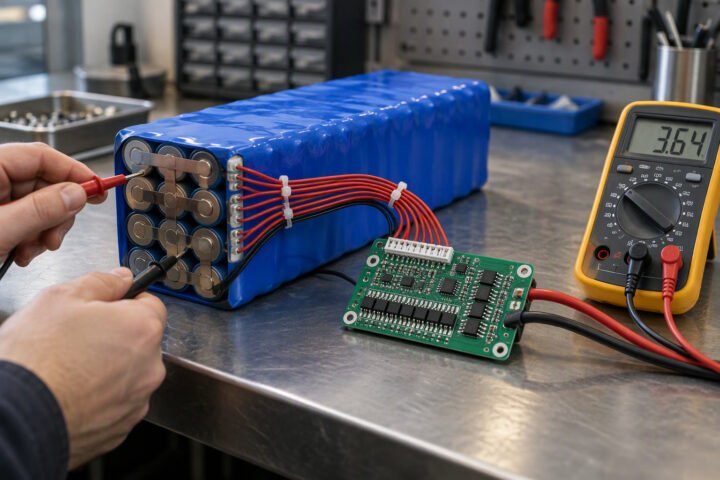
Battery state of charge (SoC) is the percentage of usable charge left in a battery, and coulomb counting estimates it by adding up the current that flows in and out over time. For battery state of charge estimation on a robot, count charge with a current sensor, correct the count with a rest-voltage reading, and reset it at full charge.
Key takeaways
- State of charge is the remaining charge divided by the battery’s full capacity, shown as a percentage.
- Coulomb counting subtracts the charge drawn, where charge in amp-hours equals current in amps times time in hours.
- Small current sensor offsets add up over hours, so a pure count drifts and needs a periodic correction.
- Lithium cell voltage is flat across much of the discharge, so voltage alone is a rough guide that works best at rest.
What State of Charge Means
State of charge is how full the battery is, as a percentage of its present capacity. It is different from state of health, which describes how much capacity the cell has lost with age. A cell that is 100 percent charged but worn out may hold only 70 percent of its original rating, and a robot that assumes the original rating will over-estimate its runtime.
SoC cannot be measured directly, so every method estimates it from something measurable: current over time, or voltage. A battery management system often does this for you, as described in the battery management system guide. If you build your own estimate, you need to understand where it goes wrong.
Coulomb Counting Formula
Coulomb counting integrates current over time. The charge removed is Q = I x t. In a sketch you add a small amount of charge on every sample: dQ = I x dt. Then SoC = SoC_start – (total charge removed / capacity) x 100.
Worked example, assuming a pack of two 2600 mAh cells in parallel, so the capacity is 2 x 2600 = 5200 mAh (a nominal figure; check the cell datasheet and allow for ageing). The pack starts at 100 percent and the robot draws 1.5 A for 20 minutes.
- Time in hours = 20 / 60 = 0.3333 h.
- Charge removed = 1.5 A x 0.3333 h = 0.5 Ah = 500 mAh.
- Fraction used = 500 / 5200 = 0.09615.
- SoC = 100 – 9.615 = 90.38 percent.
In code you add each sample. At a 100 ms sample interval with 1500 mA flowing, each sample adds 1500 x 0.1 / 3600 = 0.04167 mAh (the divide by 3600 converts amp-seconds to amp-hours). Use millis() or micros() to measure the real interval instead of assuming it, as the interval varies if your loop is slow; see the control loop timing article. Use a float or a 32-bit integer for the running total, because a 16-bit integer overflows quickly.
Current Sensor Accuracy
Sensor accuracy limits coulomb counting because every error is accumulated. Two error types matter. An offset error adds the same small current all the time, even at zero load. A gain error scales every reading by a fixed percentage. Check the datasheet of your sensor for both, such as that of the INA219 current sensor used in the robot battery current monitor project.
Worked example with assumed errors. Suppose the offset is 10 mA and the gain error is 1 percent, over a 10 hour session in which the robot truly uses 3000 mAh.
- Offset error = 10 mA x 10 h = 100 mAh, which is 100 / 5200 = 1.92 percent of the pack.
- Gain error = 1 percent of 3000 mAh = 30 mAh, which is 30 / 5200 = 0.58 percent of the pack.
- Worst case combined = 130 mAh, about 2.5 percent of the pack (130 / 5200 = 0.025).
That is acceptable for one session, but not for days without correction. Also remember that quantisation, sampling too slowly during fast current spikes, and the robot’s own standby draw when the sensor is off all add error. Count charging current too, with the opposite sign.
Voltage-Based Estimate
A voltage-based estimate reads the open-circuit voltage and looks it up against a curve for that chemistry. A single Li-ion cell is commonly charged to about 4.2 V and discharged to about 3.0 V, but the curve is flat in the middle, so a small voltage error means a big SoC error. Cell types differ, so use the curve in your own cell’s datasheet instead of a generic table.
The estimate only works at rest. Under load the terminal voltage is lowered by current times internal resistance (see battery internal resistance and voltage sag), so a reading taken while the motors run suggests a lower SoC than the truth. Measure voltage with a divider and an ADC pin, as in the battery voltage monitor project, and wait until the current has been near zero for a few minutes before trusting it.
Combining Both
Combining both methods uses each where it is strong. Coulomb counting is good over short times but drifts. Voltage is noisy under load but has no drift when the battery rests. A simple approach:
- Run the coulomb count while current flows.
- When the robot has been idle for several minutes, read the rest voltage, convert it to an SoC from the cell curve, and nudge the count toward it. Replace the count outright only if the two differ by a large margin.
- Limit the correction step so that one noisy reading cannot jump the display from 60 to 20 percent.
More advanced filters (such as the Kalman filter) do the same thing in a principled way, but a simple blend is a good first version. The sizing numbers in the battery sizing calculation give you a sensible capacity to start from. For the cell chemistry background, see the robot battery guide.
Resetting the Count
Resetting means setting the SoC to a known value when something reliable tells you the battery’s state. The most trustworthy moment is the end of a full charge: when the charger has finished (the current has tapered to its termination level) the cell is full, so set the count to 100 percent and the capacity used to zero. Some designs also reset at a low-voltage cutoff, treating it as empty.
Save the count to non-volatile memory sparingly, for instance when the robot powers down, so that a restart does not forget it (see the EEPROM article for safe write patterns). Re-learn the capacity occasionally by timing a full discharge at a known current, since capacity falls as cells age. More electronics background is in the Learn hub.
Caution: do not run lithium cells below the cutoff in the cell datasheet to test an empty point, and use a protection circuit. This is general guidance, not a substitute for a qualified engineer.
How to check this yourself
- Charge the pack fully, record its rest voltage, and set the count to 100 percent.
- Run the robot at a known steady current for a measured time, for example with a fixed resistive load, and compute the expected charge removed by hand.
- Compare your code’s count with the hand calculation. They should match within the sensor’s accuracy.
- Rest the pack for a few minutes and compare the voltage-based SoC with the count.
- Repeat after several cycles and check whether the gap grows, which shows drift.
Common mistakes
- Using the rated capacity of a new cell for an old pack.
- Reading voltage under load and treating it as rest voltage.
- Assuming the loop interval instead of measuring it.
- Forgetting that the sensor itself and the microcontroller draw current.
- Never resetting the count, so drift builds up.
Frequently asked questions
What is coulomb counting in a battery?
Coulomb counting tracks the charge entering and leaving a battery by adding up current multiplied by time. Compare the total removed with the battery’s capacity to get the percentage left. It needs a current sensor and a known starting point, and it drifts slowly, so it should be corrected now and then.
Can I use battery voltage to show percentage on a robot?
Yes, but only roughly. The voltage of a lithium cell changes little across much of its range, and it falls under load, so readings during driving mislead. Voltage works best after the robot has rested for a few minutes. Combining it with a coulomb count gives a better estimate.
How accurate is state of charge estimation?
It depends on the sensor, the sampling and how often you correct the count. With an offset of 10 mA, for example, 10 hours adds about 100 mAh of error. Treat the result as an estimate, give yourself a safety margin, and never rely on it for safety-critical decisions.
Quick checklist
- Use charge = current x time and divide by the full capacity.
- Measure the sample interval instead of assuming it.
- Find the sensor offset and gain error in its datasheet and estimate drift.
- Correct with a rest-voltage reading, not a voltage taken under load.
- Reset to 100 percent at the end of a full charge.
Related reading
- Battery runtime calculator to compare your estimate with a quick prediction.
- 18650 battery pack for details on the cells used in the example.
- Solar panel battery charging guide for the charging side of the energy budget.
- Field-Oriented Control in Plain Language
About the author and how this is kept accurate
Written, checked and maintained by Jignesh Panchal of Jaadu Digital. Figures in worked examples come from the stated assumptions, not from a bench test of our own. Read the editorial standard, follow the author on LinkedIn, or send a correction. Last reviewed: November 2026.